Thinking Big, Shipping Small
Rethinking the tools engineers use to collaboratively develop new Bluetooth technologies.
Overview
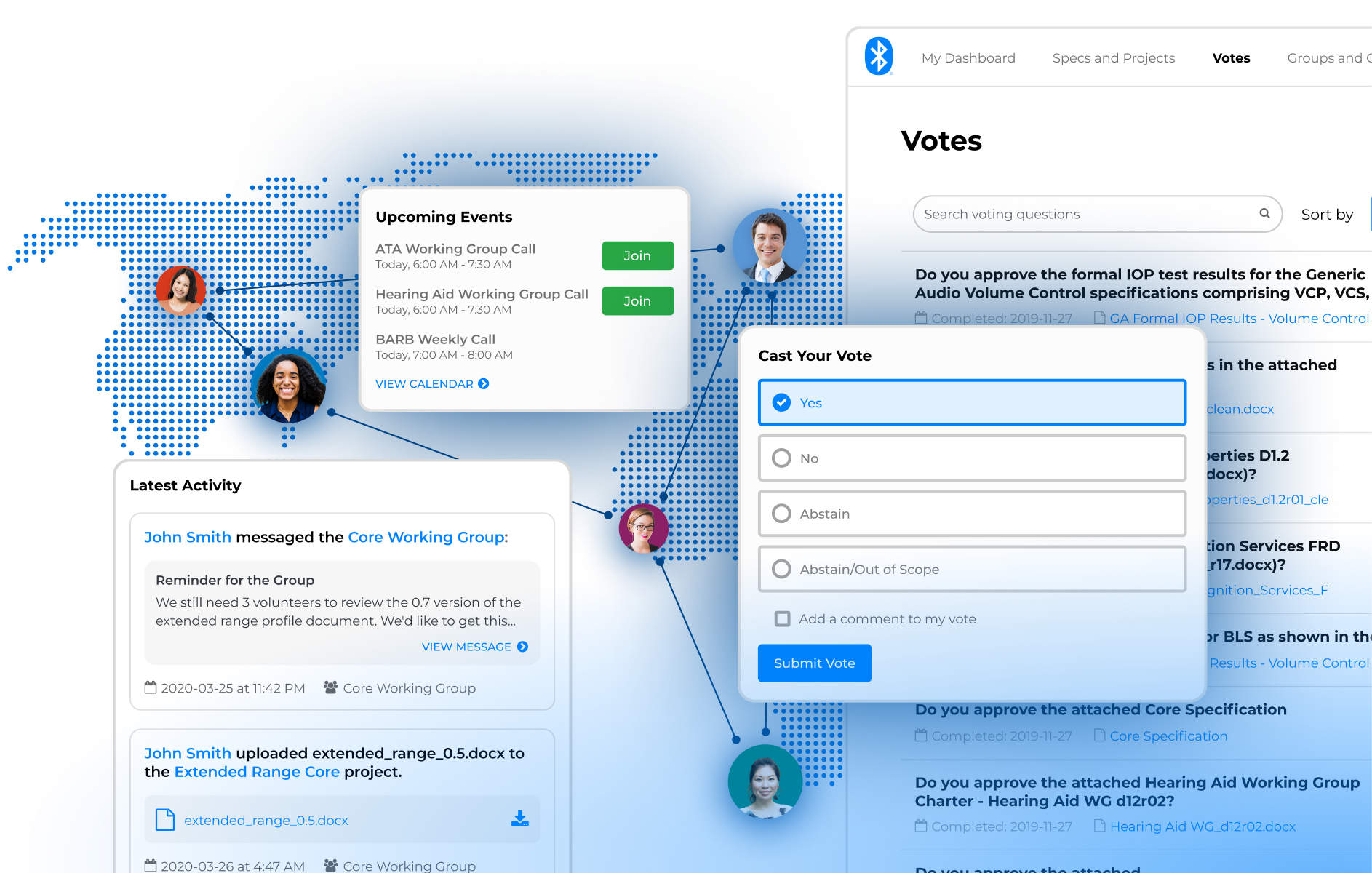
Every Bluetooth product starts with a specification.
Engineers from companies around the world propose capabilities, debate technical details, resolve issues, and vote to approve the specifications behind billions of Bluetooth products.
Over the years, the Bluetooth SIG had built more than 10 products to support that work. The result was a fragmented, aging platform that was increasingly difficult to use. Member dissatisfaction had grown from 6% to 27% since 2016.
We set out to design a unified collaboration platform to replace it. But as the vision grew, so did the cost and timeline. The project became as much about how to modernize a massive legacy platform as what the replacement should look like.
The Outcome (Spoilers)
Before I left the work, we shipped our first vertical slice: a new member voting experience. We shipped it in two releases, starting with an archive of completed votes, then moving active voting out of the legacy system. The new experience was a huge success:
My Role
I led UX strategy, research, and product design for Bluetooth Specification Tools, from foundational research and product vision through interaction design, usability testing, and implementation.
The Opportunity
Developing a wireless standard is hard.
Dozens of engineers may contribute to a single specification. Documents go through repeated revisions. Technical disagreements have to be resolved. Working groups coordinate across companies, countries, and time zones. Reviews, meetings, votes, comments, tasks, and milestones all depend on one another.
Ten Tools. One Incredibly Complicated Job.
Over the years, the Bluetooth SIG had built more than 10 products to support all of this.
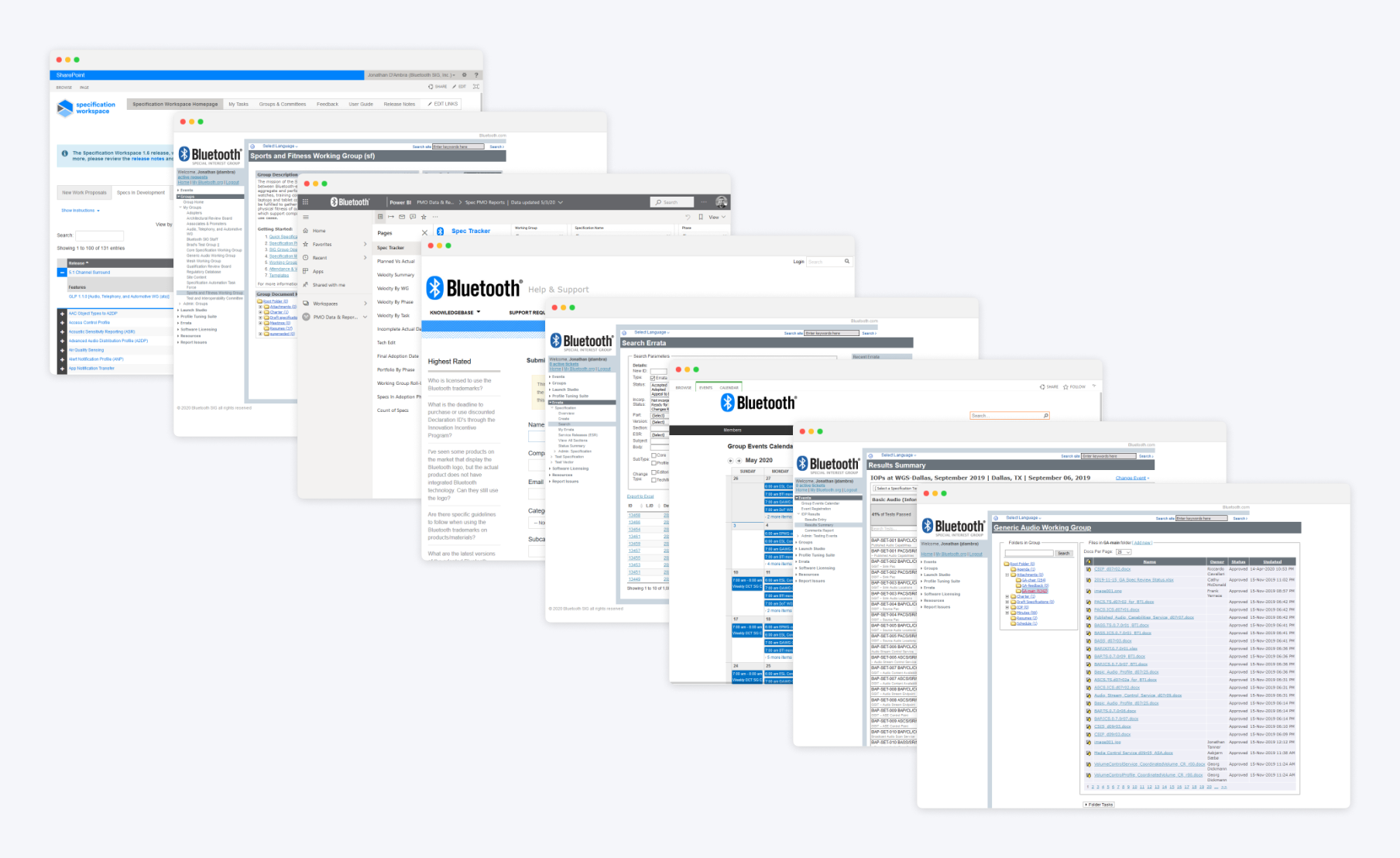
Unfortunately, the experience increasingly reflected the structure of those tools rather than the way members actually worked.
The feedback wasn’t subtle.
“The tools are ancient and are very confusingly organized. Working groups do not use them in a uniform manner.”
“I can never find any documents that I’m looking for. I rely on working group members to pass the documents through emails.”
“There is not enough space to describe all the problems. Performance is horrible. The tools are missing historical documents. Tools do not yet cover the whole process.”
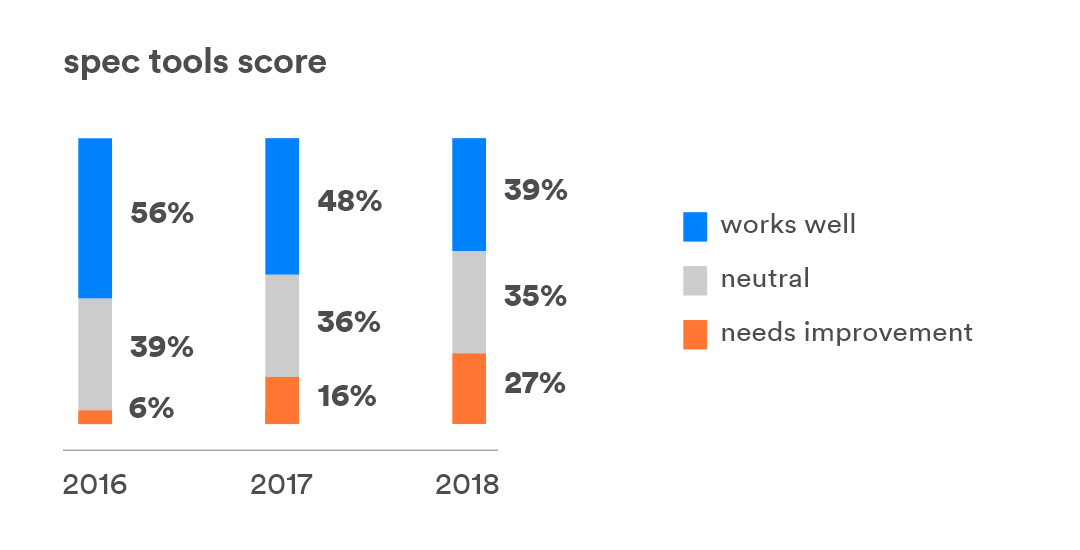
There is not enough space to describe all the problems.
The Documented Process Wasn’t Really the Process
When I joined the project, I was given documentation describing how Bluetooth specifications were developed. It was clean, linear, and made sense.
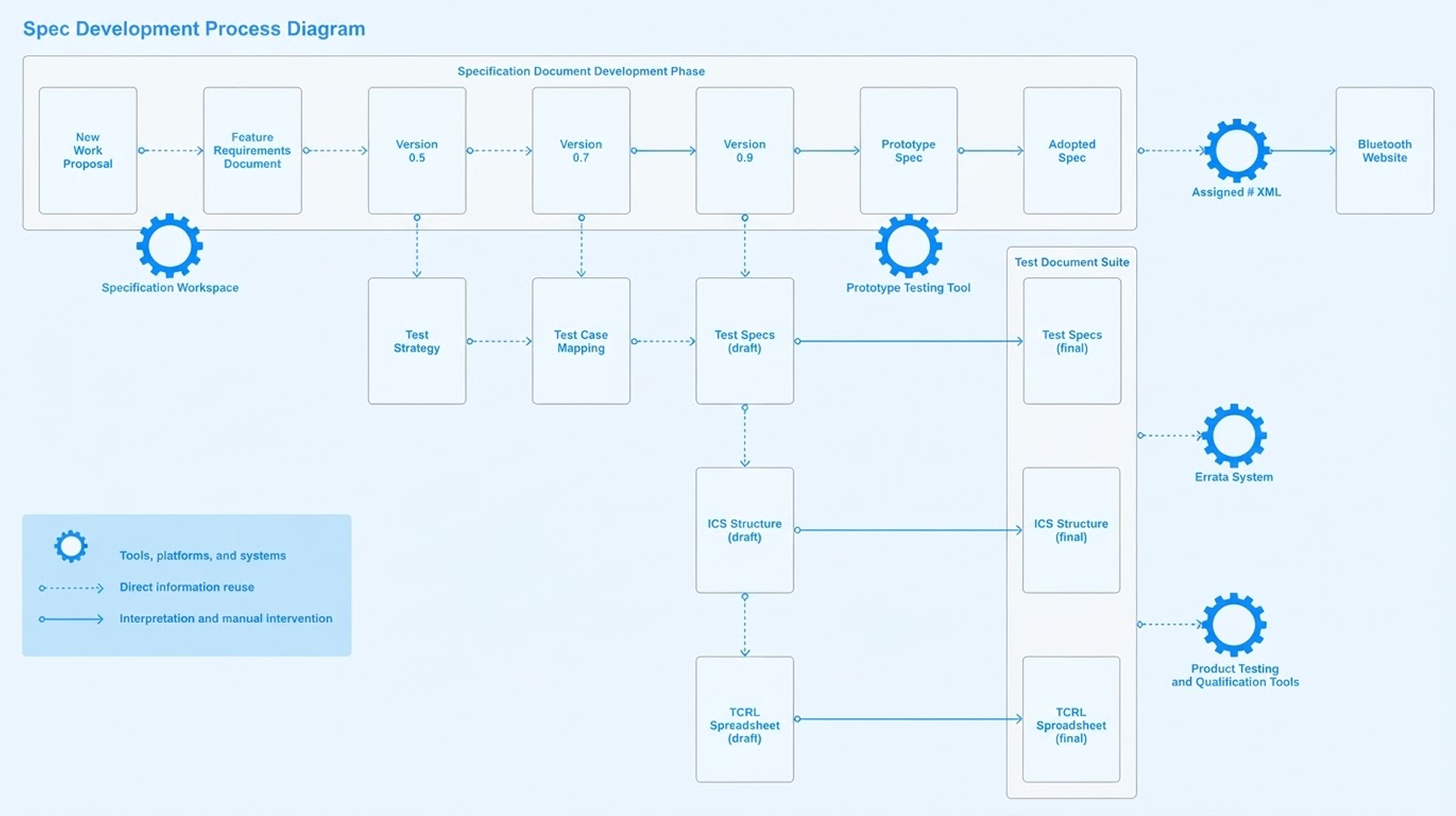
Then I started sitting in on actual working-group meetings. The documentation captured the major milestones pretty well. What it didn’t capture was almost any of the messy day-to-day work required to reach them.
A clean, linear process moving from one milestone to the next.
An iterative process full of negotiation, coordination, and repeated cycles.
People negotiated. They asked questions. They chased reviews. They shared drafts, lost track of drafts, waited for someone in another time zone, scheduled meetings, revisited decisions, hunted for documents, and worked around our software.
Sometimes things happened out of order. Other times, things happened again and again over several cycles.
Before redesigning the tools supporting this process, I wanted to understand that version of it.
The Problem Space
I turned to Indi Young and her work in Mental Models and Practical Empathy. Her approach to generative research was a good fit for a problem space where we still had a lot to learn.
Rather than walking participants through our software or asking what features they wanted, we started with their personal experiences with specification development and mostly let them lead the conversations. I conducted non-directed interviews with 12 members and synthesized what I heard into a mental model diagram. It helped us understand their behaviors and motivations, but also revealed where our existing tools weren’t supporting them.
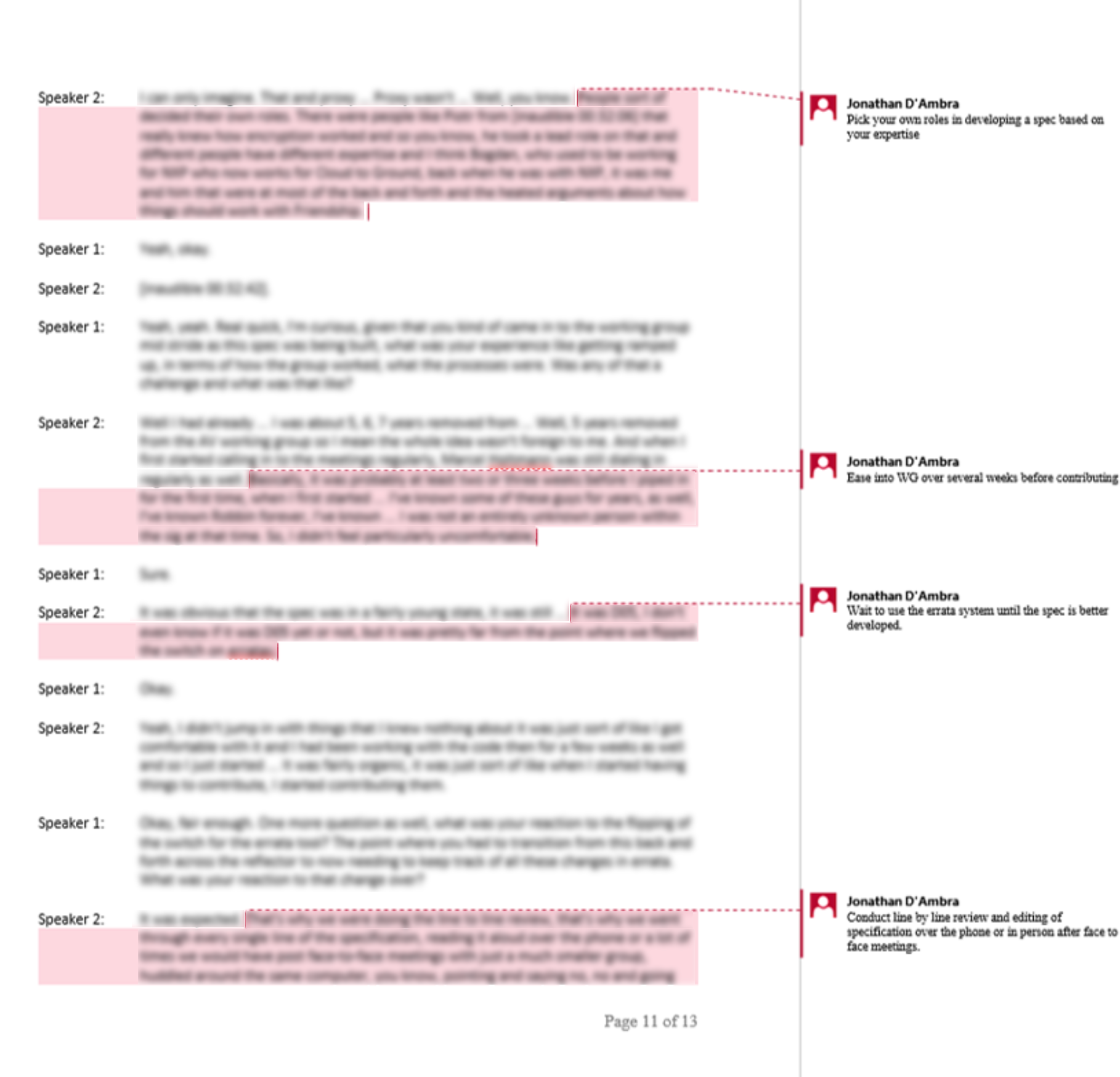
I worked through each transcript looking for statements that revealed participants’ reasoning, reactions, and guiding principles. I pulled those statements out, summarized the underlying thinking, and started grouping similar ideas together.
Those groups became broader mental spaces. Eventually, a pile of interview transcripts became this:
Printed on 24-inch paper, the complete diagram was roughly 15 feet long.
But the scale was useful. Specification development was complicated. Rather than simplifying that complexity away so we could fit it neatly on a slide, the model gave us a way to see the whole thing at once.
Mapping Their Reality
Understanding how members thought about their work was only half of the exercise.
Next, I worked with our product and program managers to inventory the features, tools, and resources we already provided. We printed the mental model, covered a room with it, and started mapping those solutions against the behaviors we’d identified.
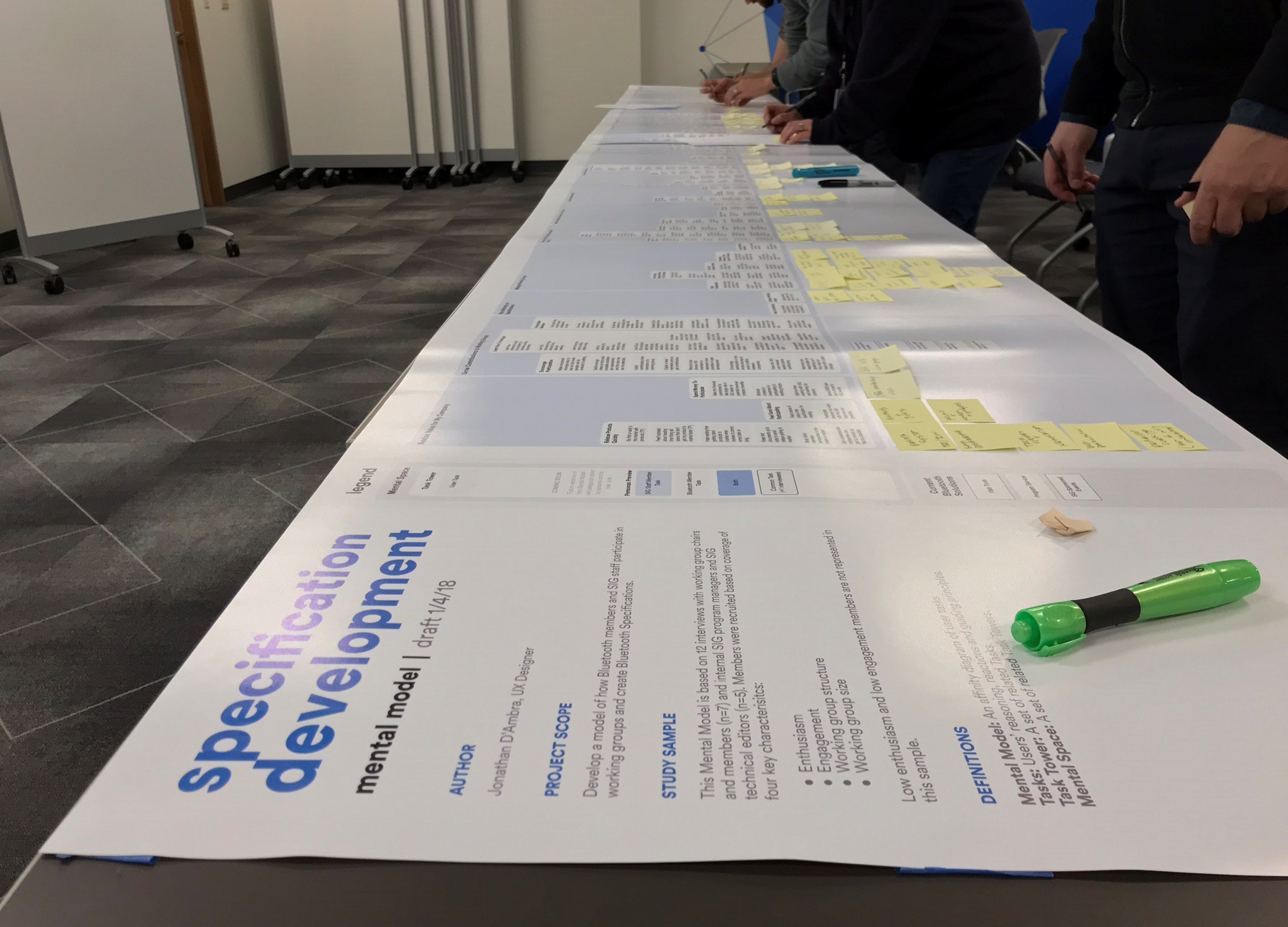
Some areas of member behavior were well supported. Some had only partial support. Some important behaviors had essentially nothing supporting them at all.
And, somewhat painfully, we found functionality we’d invested in that didn’t map particularly well to anything members were trying to accomplish.

The exercise changed how we talked about priorities. Instead of starting with our existing tools and features, we could start with the gaps in how we supported members’ work.
Which tool should we fix? Which feature should we build?
Which parts of our members' work are we doing the worst job of supporting?
That gave us a much stronger foundation for deciding where to invest, and ultimately helped us reprioritize significant parts of the product roadmap.
Researching the Gaps
The mental model was intentionally broad. It helped us understand the problem space, but it didn’t answer every question we had about who was doing the work or exactly where the existing tools were breaking down.
So we gathered another layer of evidence.
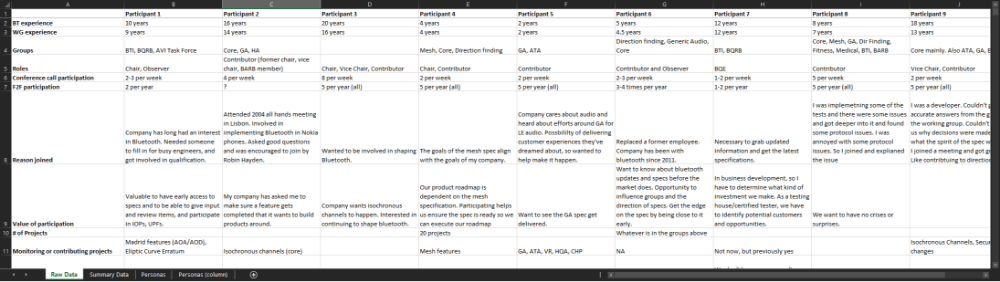
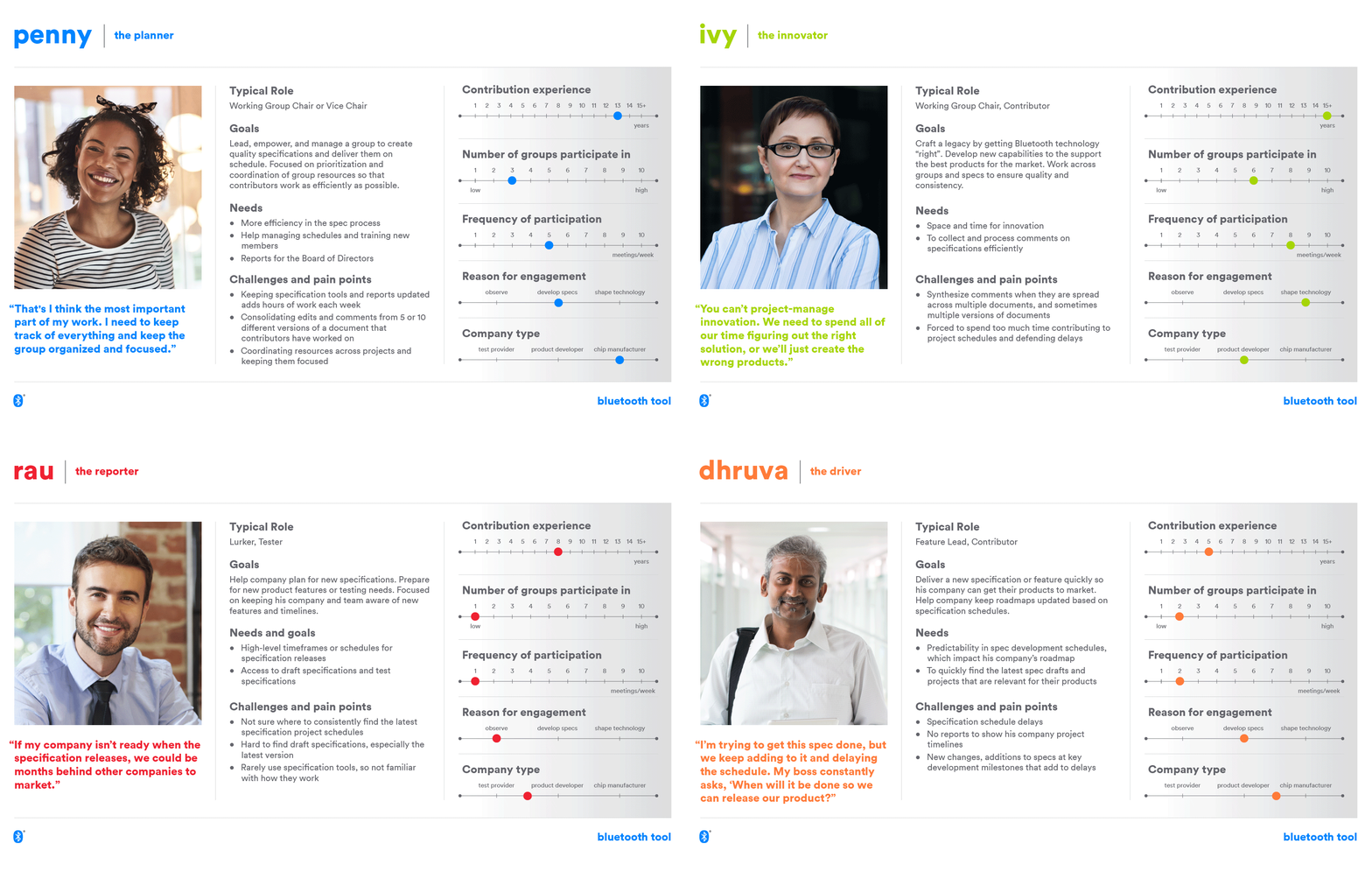
I conducted another 14 interviews focused more specifically on goals, behaviors, and scenarios. We synthesized those into four behavioral personas that we could use when writing scenarios and making product decisions.
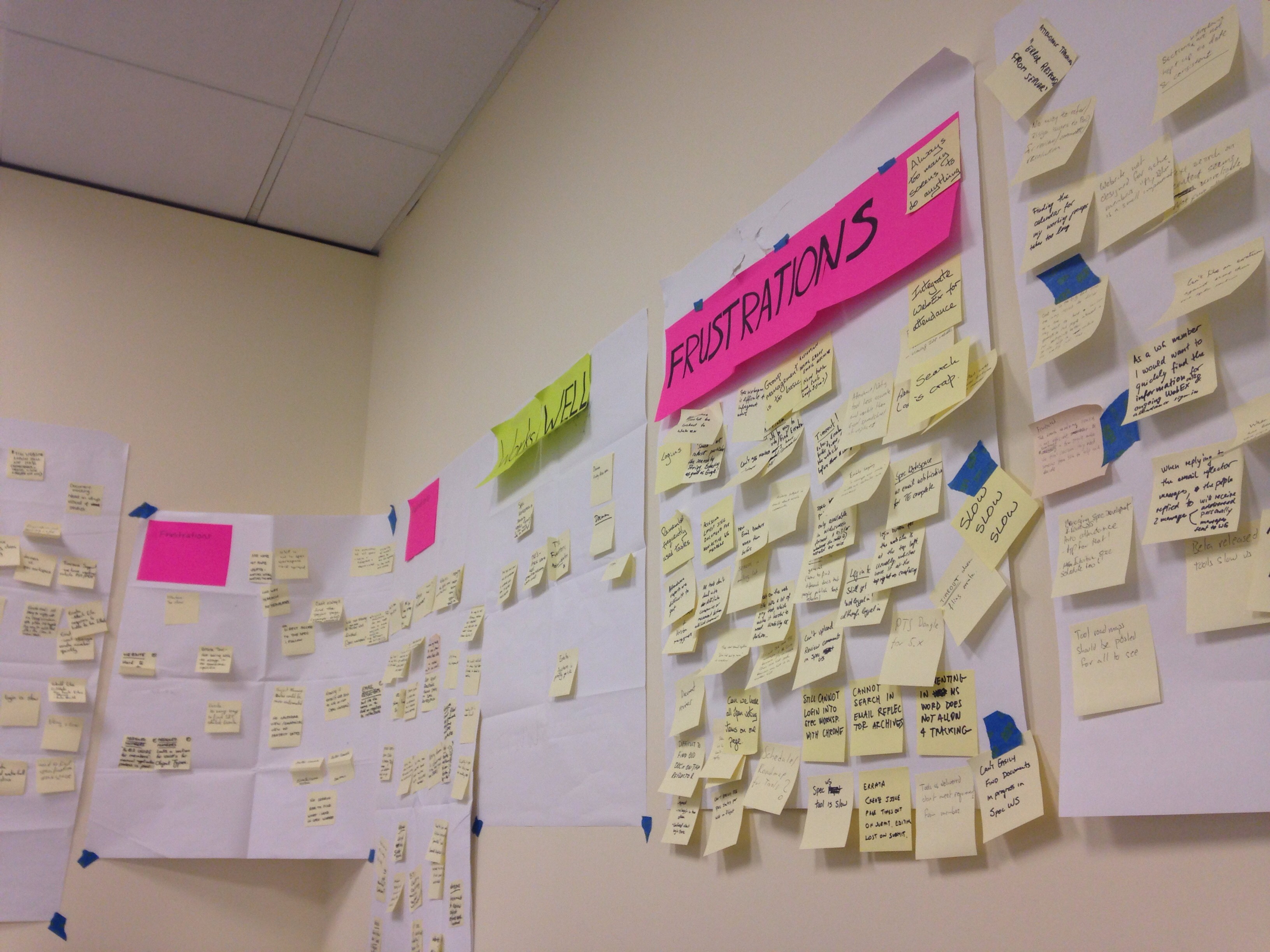
We also dug up an existing System Usability Scale study that contained a lot of useful member comments. Rather than immediately commissioning yet another survey, we used that as a starting point and conducted seven in-person workshops where members told us what worked and what didn’t across the current tools.
That produced nearly 400 individual pieces of feedback.
We cataloged feedback by feature, tool, and scenario and continued adding to it throughout the project.
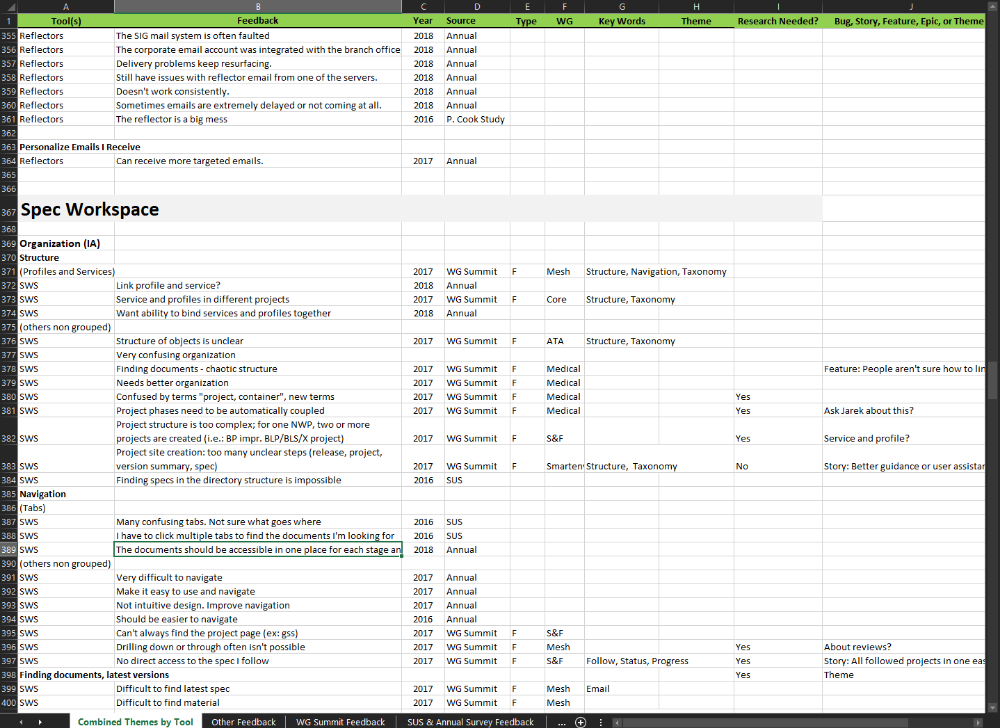
It wasn’t sophisticated software. It wasn’t particularly attractive. But it was incredibly useful.
When somebody asked, “Do members actually care about this?” we could usually answer with something better than the opinions of the people sitting in the room.
Research only matters if people believe it
By this point, we understood the problem pretty well. Unfortunately, understanding the problem and getting an organization to invest in solving it are two different things.
The scale of the project meant we needed significant engineering investment, and we weren’t getting it.
So to bridge the communication gap, I conducted five contextual-inquiry sessions with key members and asked them to do their real work while we recorded their screens and commentary.
That gave me more than six hours of footage of people actually struggling with our products, which I edited into a 15-minute highlight reel organized around the major workflows and pain points we’d been hearing about.
We played it for leadership. When the highlight reel ended, the first question was: Okay, how do we get started?
When the highlight reel ended, the first question was: Okay, how do we get started?
We hadn’t suddenly discovered a new problem. Leadership was seeing the same problems we’d been describing for months. They could just finally see people experiencing the pain firsthand.
What We Learned
After all of that research, three larger problems kept showing up.
Collaboration Was Nearly Invisible
Specification development depended on dozens of people doing interdependent work, but there was no central place to understand what everyone was doing.
People pieced together status through email, meetings, phone calls, and individual tools. One missing contribution could stall progress for months.
Workflows and Information Were Fragmented
Documents went through dozens of revisions. Members were typically interested in only a handful of the 100+ specifications being developed, but the tools treated almost everything as equally relevant.
Finding the right document, understanding its status, or sometimes simply waiting for a page to load could consume a surprising amount of time.
We Assumed People Understood the Process
Most didn’t.
Specification development was complicated, and our tools did very little to guide people through it. Steps happened out of order. Work had to be redone. Less-experienced members depended heavily on experts to tell them what happened next.
We needed to design around the way specification development actually happened, not around the products we’d accumulated over the years.
A North Star Vision
Once we had a shared understanding of the problem, I wanted cross-functional partners across the organization to participate in defining the solution. We needed the expertise, and more importantly, their buy-in.
I wanted us to have something more useful than a collection of feature requests. Inspired by Julie Zhuo’s approach to establishing a North Star, I set out to create a shared vision of what the experience could become over the next three to five years.
Drawing on my workshop facilitation training from Nielsen Norman Group and Google’s Design Sprint methodology, I planned a cross-functional workshop with engineering, product, program management, and leadership.
We worked through business goals, research findings, brainstorming, sketching, dot voting, and collaborative storyboarding to establish a direction everyone could get behind.
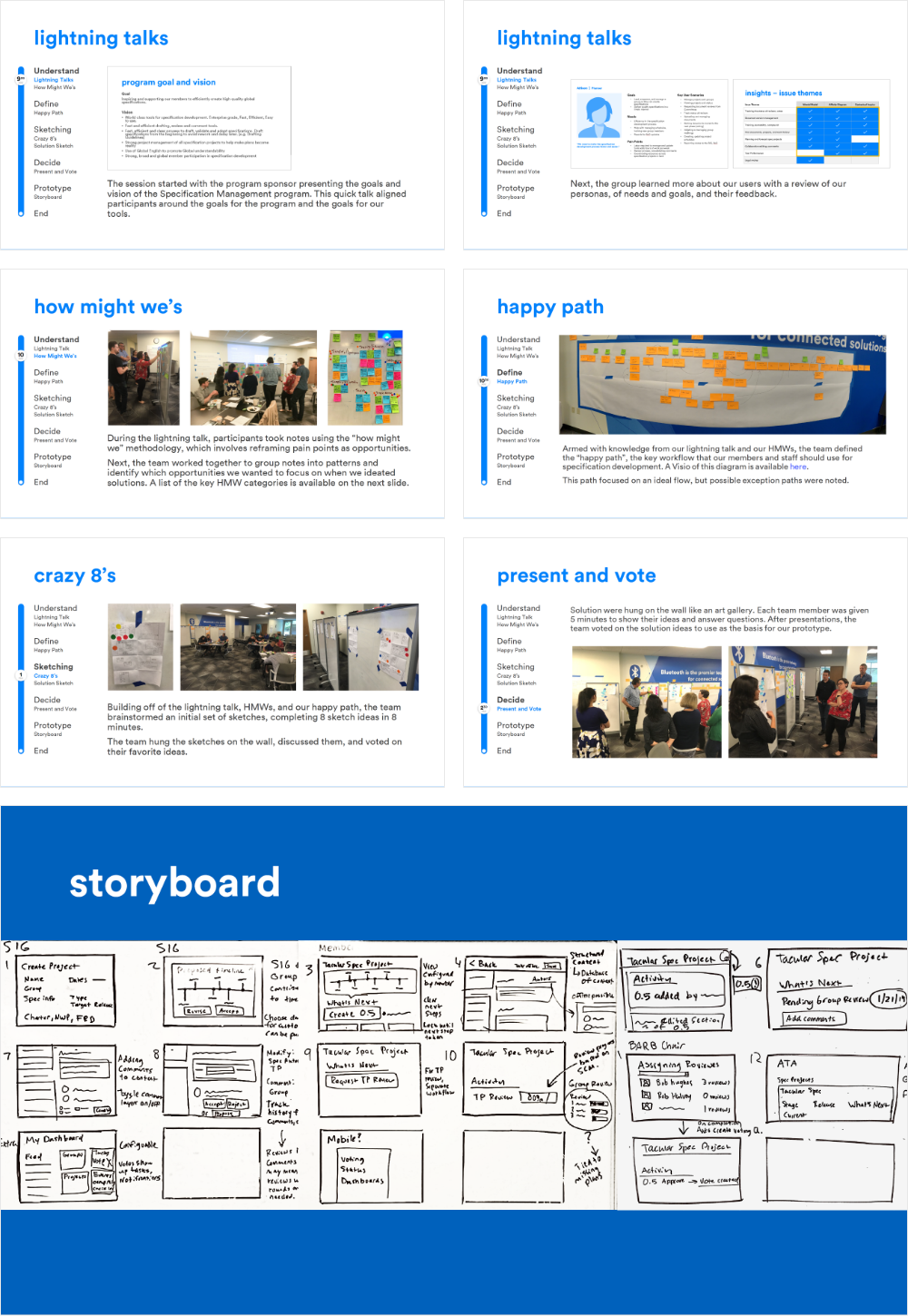
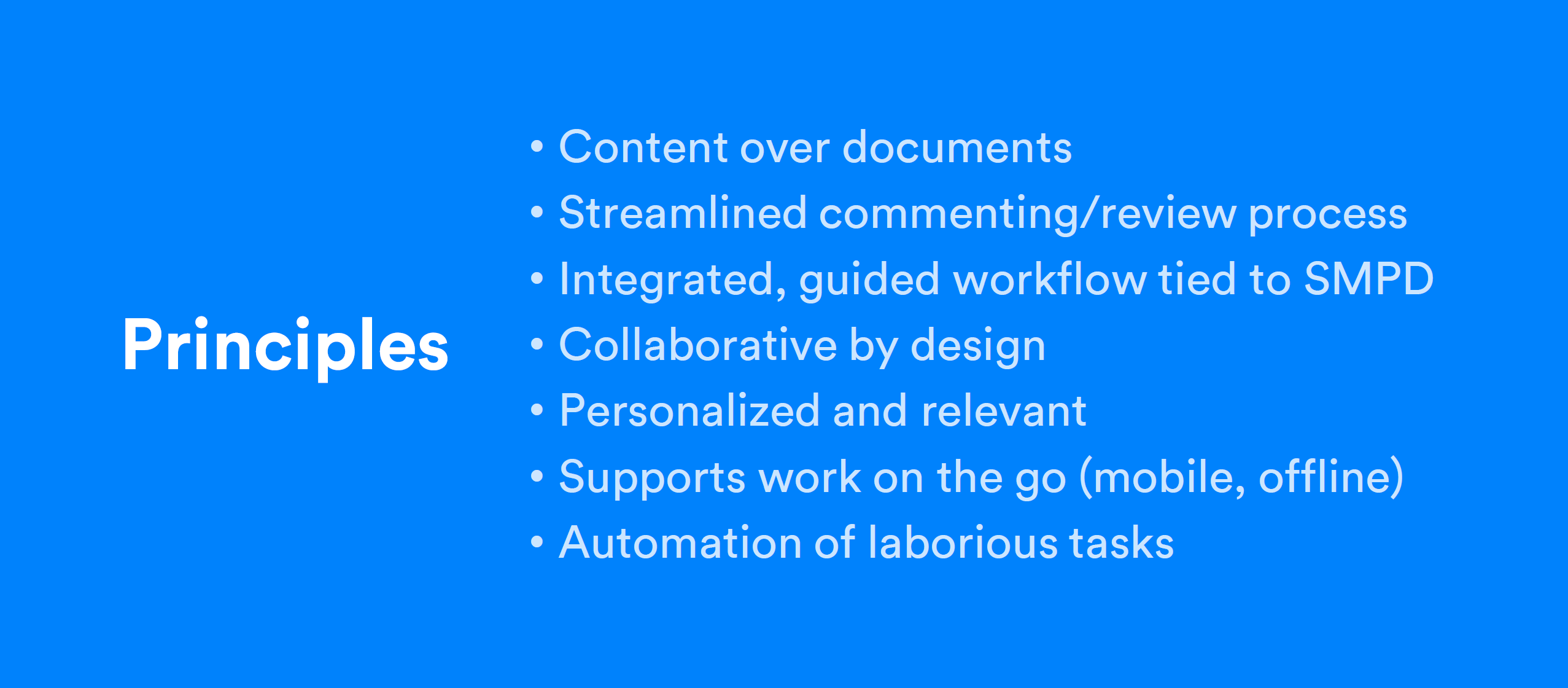
I synthesized the workshop output into a set of principles and a 3–5 year North Star.
The platform should be:
- Collaborative to the core: Make activity and changes visible instead of hiding them across disconnected tools.
- Effortless: Reduce the enormous amount of time members spent navigating, finding information, and learning the process.
- Trustworthy: Give members confidence that they’re looking at the right information and that the system will help them get their work done.
From there, I translated the storyboard into a product vision.
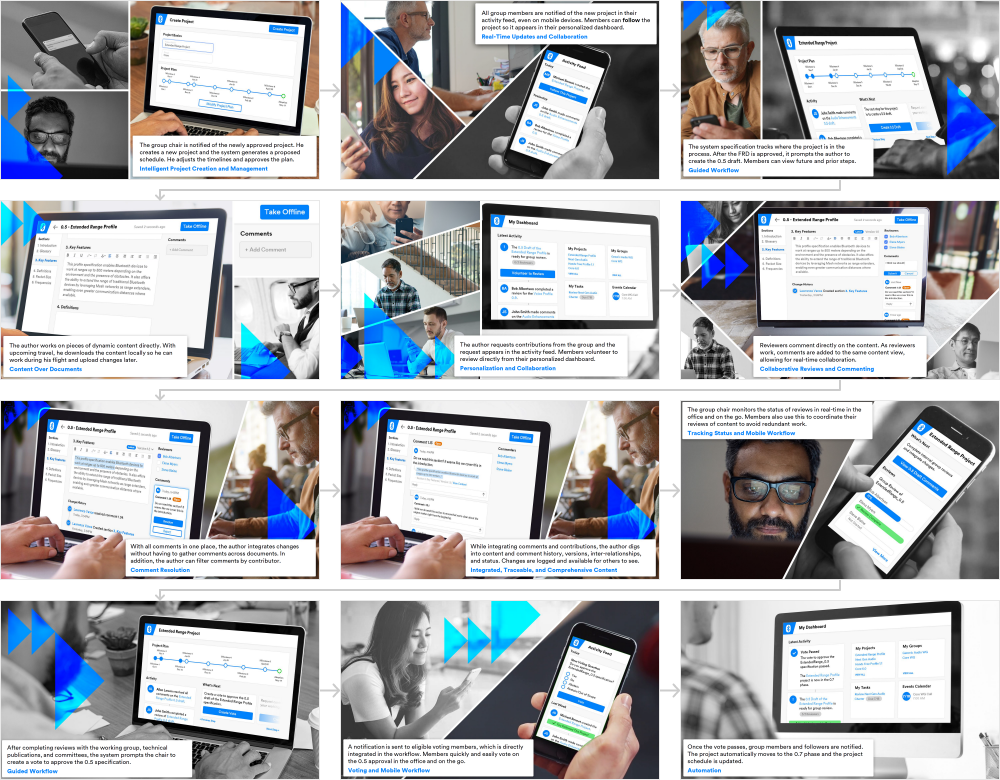
It was ambitious. Possibly too ambitious.
Members Liked the Vision, But Were Deeply Skeptical
I took the storyboard to a member event and conducted eight concept tests. Participants evaluated the concept across five attributes.
The results were encouraging overall. Members understood the direction and generally responded positively to it.
One score stood out, though: Believability.
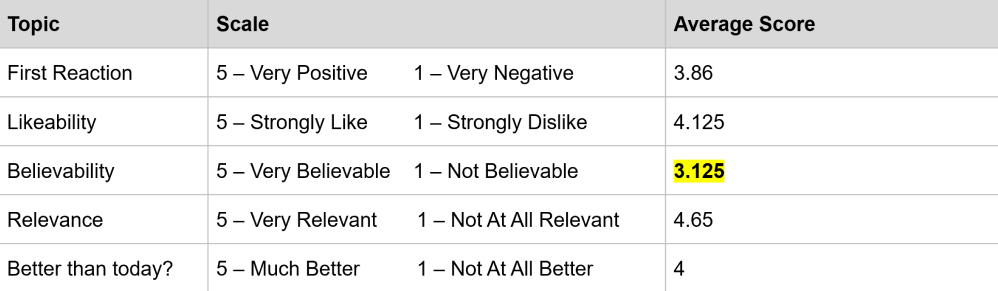
Basically, members liked what we were showing them. They just weren’t convinced we’d actually build it.
Given their experience with the existing products, that was fair. And as it turned out, their skepticism foreshadowed the next problem we had to solve.
An Evolving Strategy
Modeling the System
As we moved from a vision toward something we could actually build, I didn’t want to jump directly into screens.
Part of the reason the existing suite had become such a maze was that the underlying concepts and relationships weren’t particularly clear.
I wanted members to move through the system based on what they were working on, rather than constantly returning to top-level navigation and drilling back down.
I borrowed from Sophia Prater’s Object-Oriented UX methodology to map the important objects in our system and how they related to one another.
This gave us a way to discuss information architecture, contextual navigation, and available actions without getting distracted by interface details.
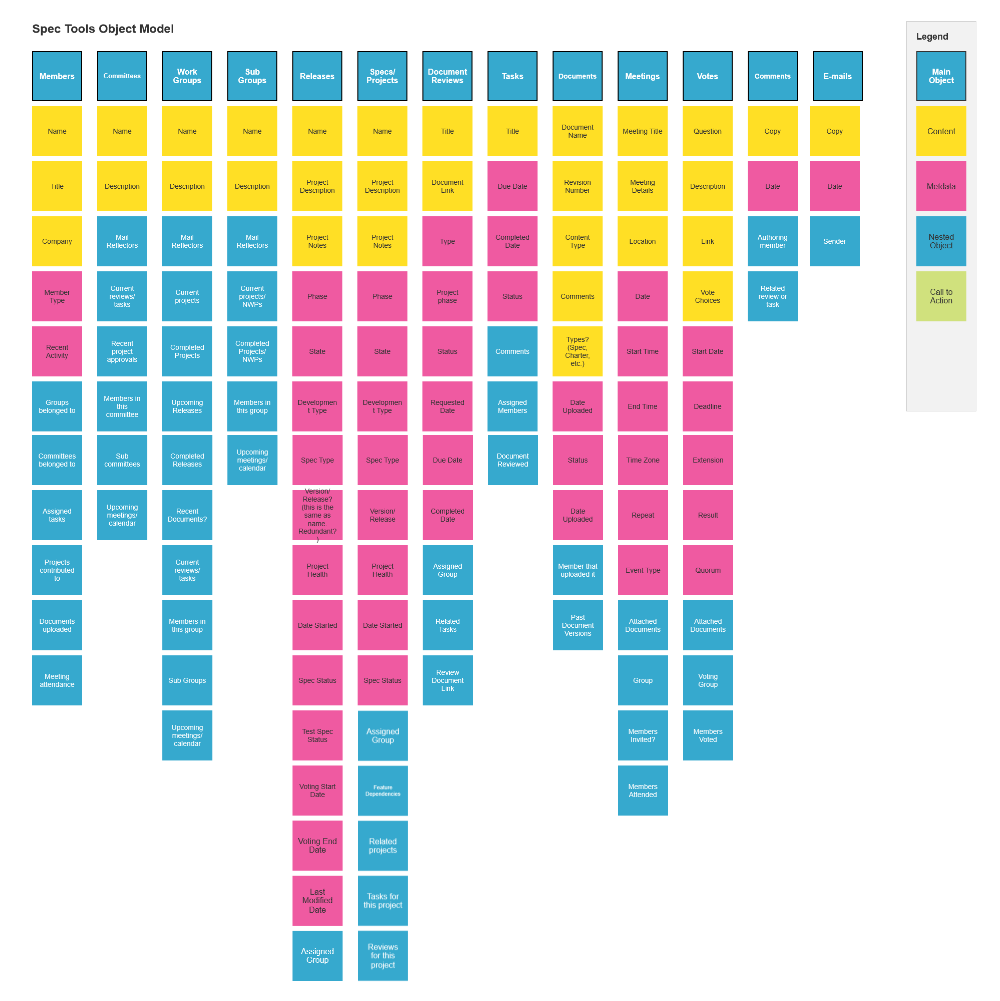
Projects contained documents. Groups worked on projects. Members belonged to groups. Projects moved through phases. Votes advanced work. Tasks belonged to people. Activity happened around all of it.
Effortless Navigation
The first major principle we anchored on was directly related to our object map: the need to make movement through the system effortless.
If I’m looking at a project, I shouldn’t need to back out to some giant global navigation tree to find the group working on it or the documents associated with it. Those relationships already existed in the work. The interface should reflect them.
Activity First
Another idea kept coming up throughout the research: much of specification development was really about figuring out what changed while you weren’t looking.
That led us to make activity a first-class concept in the platform.
Comments, document uploads, tasks, new projects, phase changes, events, and even existing group emails could feed into a centralized activity stream.
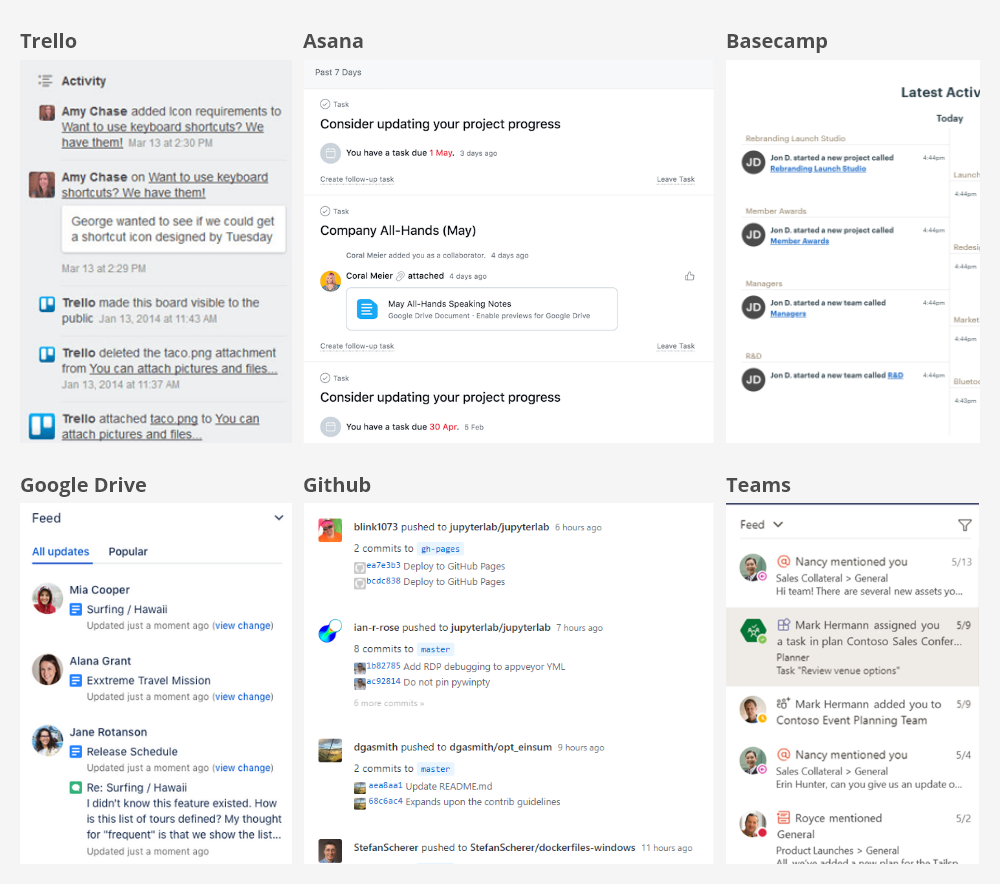
Members could then filter that activity around the things they actually cared about. It sounds pretty normal now. At the time, it was a meaningful departure from a collection of largely disconnected tools that expected members to go looking for updates themselves.
Make the Product Personal
The existing tools also treated the entire Bluetooth organization as if it were equally relevant to everyone.
However, most members participated in only a handful of groups and specification projects at any given time. So instead of dropping members into the entire Bluetooth universe, the new platform would start with their slice of it:
My review tasks. My projects. My working groups. My events. My messages and activity.
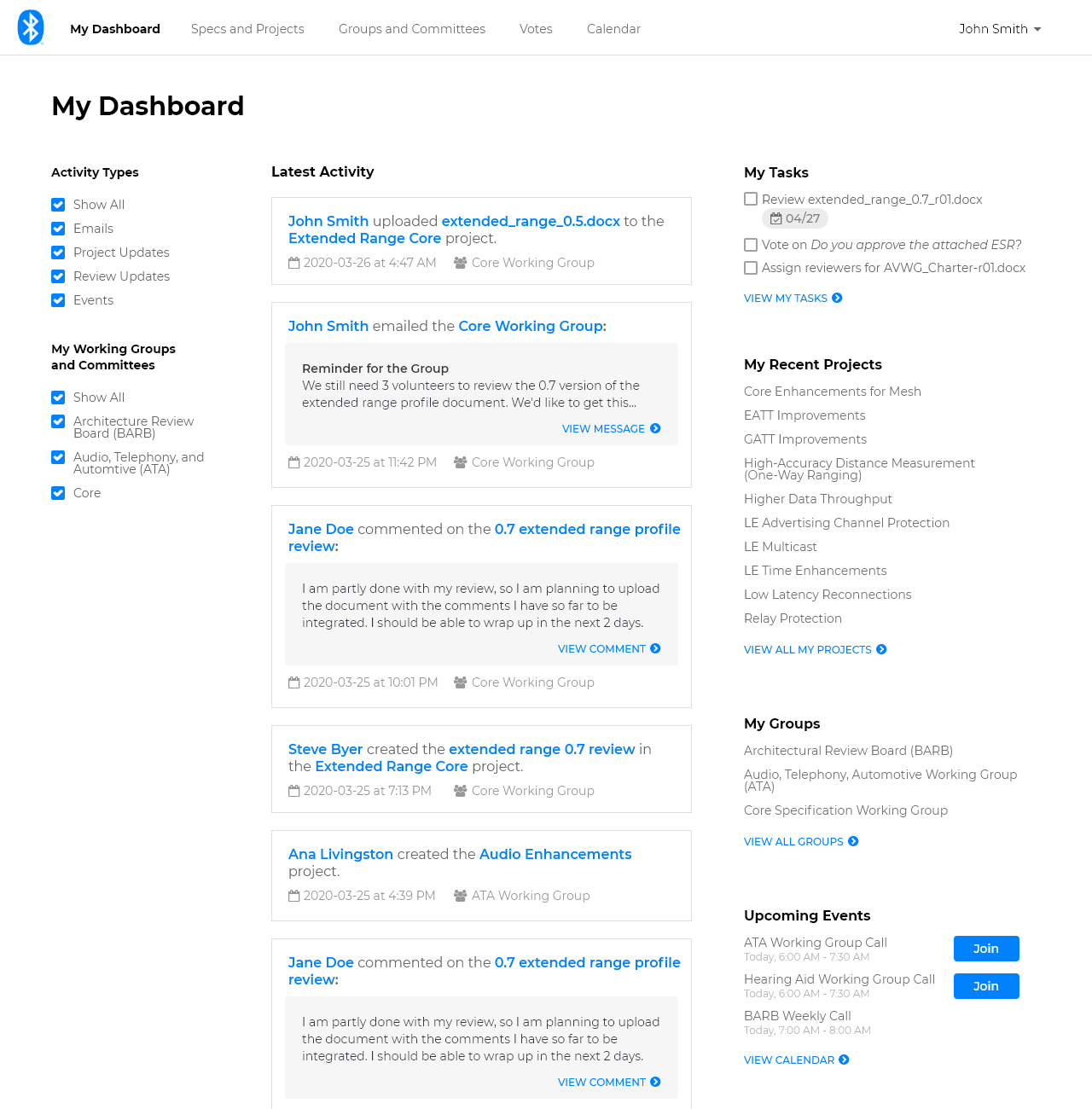
This became an important organizing idea for the architecture and dashboard vision.
Good Vision. Wrong Plan.
At this point, things seemed to be going rather well.
We had a deep research foundation. Leadership was bought in. Members responded positively to the vision. We had an architecture and early product concepts.
Unfortunately, we had also designed something enormous.
Our original strategy assumed we could build a substantial portion of the replacement platform on top of the existing technology and eventually transition members over.
As engineering dug deeper into that plan, it eventually became clear that members could be waiting years before they saw meaningful value from all of this work. The big redesign we’d finally convinced everyone to invest in was at risk of collapsing under the weight of its enormous costs and timelines.
Goodbye Waterfall
We went back to engineering.
The engineering team proposed a different approach: replace smaller pieces of the legacy platform incrementally, rather than wait for an entirely new system to be ready.
It was similar to the Strangler Fig pattern, where new functionality gradually takes over from an existing system.
The old platform would shrink while the new one grew around it.
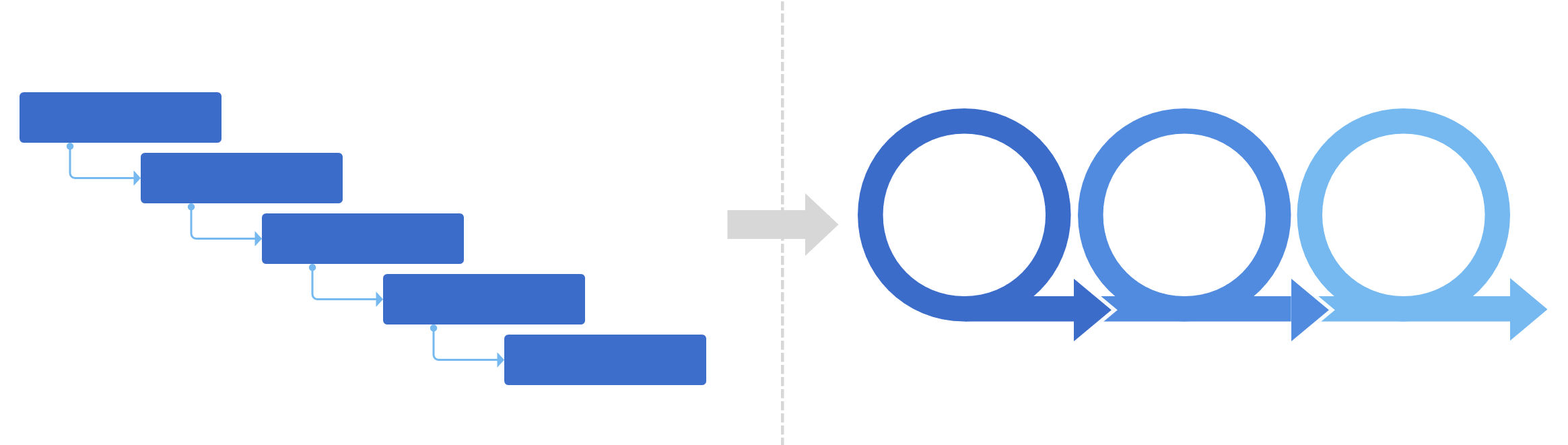
Engineering proposed the incremental architecture. My job was to help turn it into a workable member experience.
I worked with the team to evaluate potential releases against member value and replacement cost. Then I adapted the design around those boundaries, including the awkward period when members would move between the old and new systems.
The North Star still gave us a direction. But I now needed to design useful releases that could stand on their own. The question changed from:
How do we build the new collaboration platform?
What’s the smallest meaningful piece of this platform that we can replace?
That question turned out to be much more useful.
Finding the First Slice
We broke the platform into functional areas and evaluated them based on two things:
- How valuable would this be to members?
- How expensive would it be to replace?
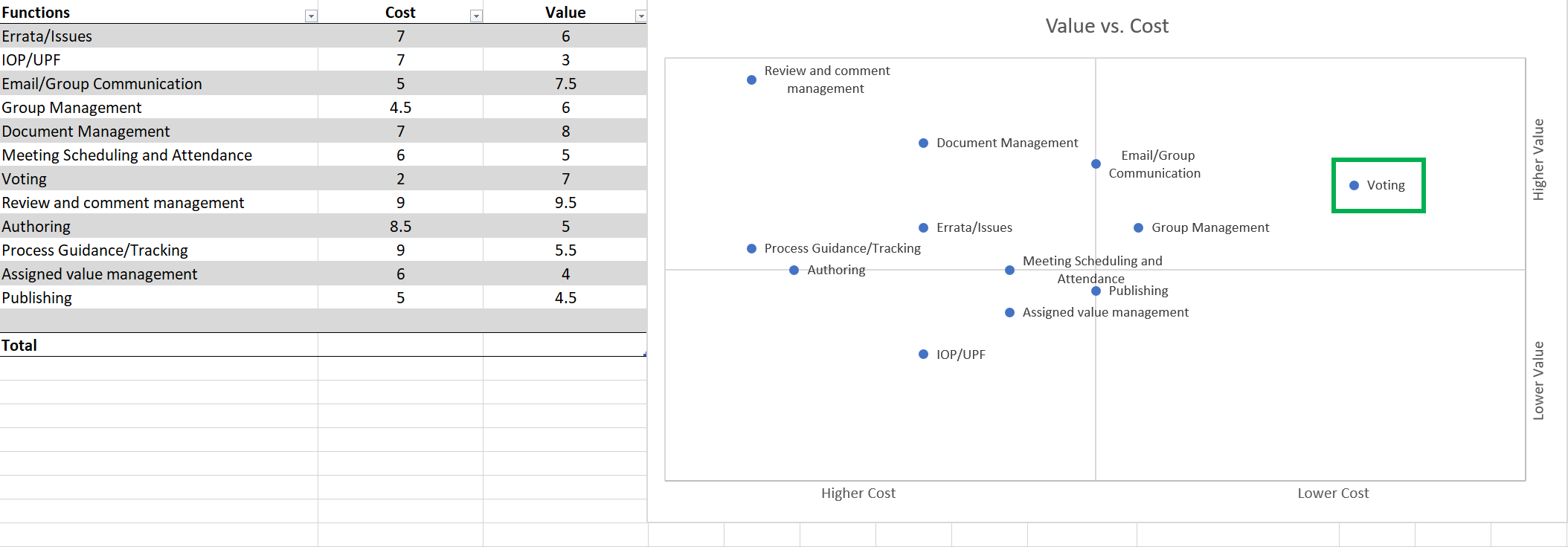
Voting quickly emerged as a strong candidate.
Voting was critical to specification development, and the existing experience had some very obvious problems. During contextual inquiry, some international members experienced load times of more than 75 seconds.
Years of accumulated voting records were also putting increasing pressure on the legacy system.
While this wasn’t the biggest piece of our vision, it was bounded enough that we could replace it, painful enough that members would notice, and important enough that successfully shipping it would tell us whether this incremental strategy could work.
Designing the First Slice
This is where the project shifted from a giant platform vision back into traditional product design.
Persona-Driven Scenarios
I used context scenarios, drawing on Kim Goodwin’s Designing for the Digital Age, to connect our personas and their goals to the voting experience.
That helped us focus on what members needed to accomplish before deciding what the interface should look like.
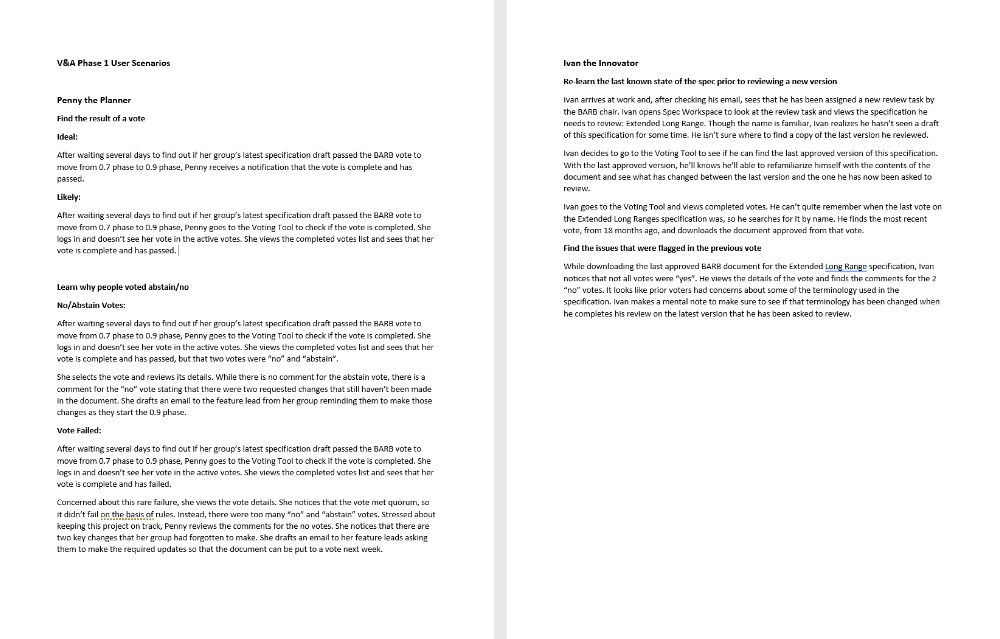
Those scenarios helped us make an uncomfortable scope decision.
The legacy system was struggling under years of accumulated voting records. Moving that archive offered our biggest opportunity to improve performance, so we started with finding and viewing completed votes.
Active voting would temporarily stay in the legacy system. That meant members would have to move between two experiences, but it let us address the biggest performance problem without waiting for the entire voting workflow to be rebuilt.
It wasn’t ideal, but it let us get a meaningful piece of the new platform into their hands much sooner.
Prioritizing Information
The existing voting experience had the same problem we’d seen elsewhere: lots of information, without much hierarchy around why somebody was looking at it.
Before opening a design tool, I wrote the available information onto Post-its and worked with the team to organize it around the things members were trying to understand.
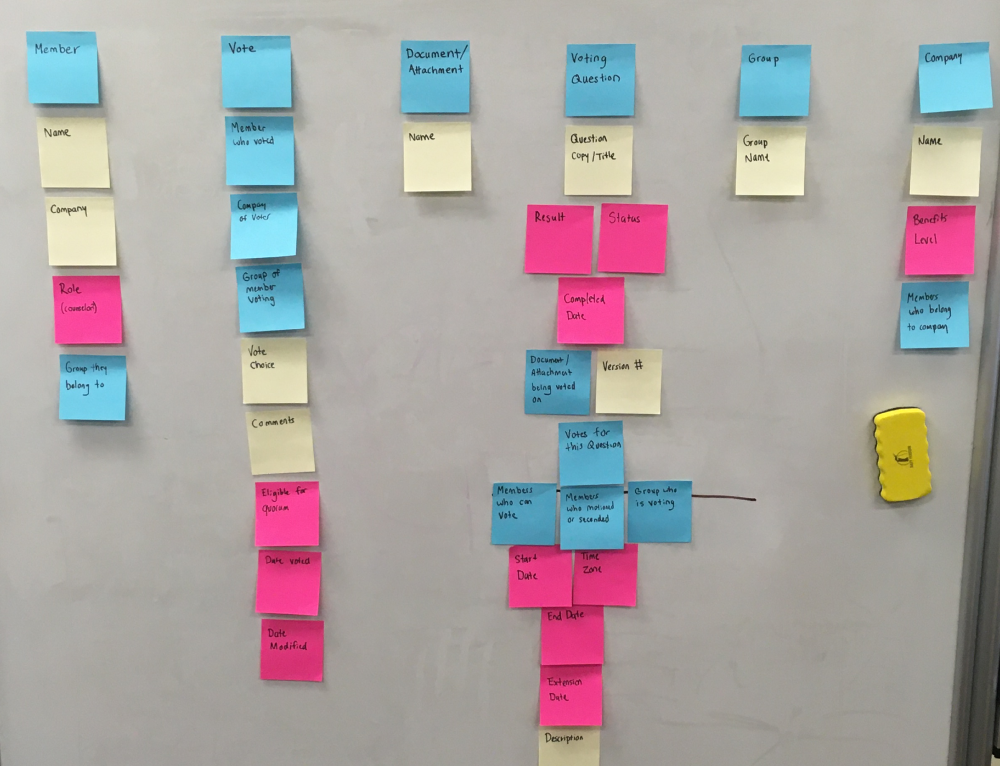
Two primary views emerged pretty quickly, each serving a different purpose:
Help members find the right voting question or document.
- Find questions and supporting documents
- See status and deadlines
- Understand voting progress at a glance
Help members cast and understand a vote and its outcome.
- What documents were involved?
- Was quorum met?
- Did it pass?
- Who voted and what did they say?
Sketchy on Purpose
I designed the voting experience across both releases, while keeping the initial launch focused on completed votes. I started with sketches and then moved into low-fidelity wireframes using Balsamiq.
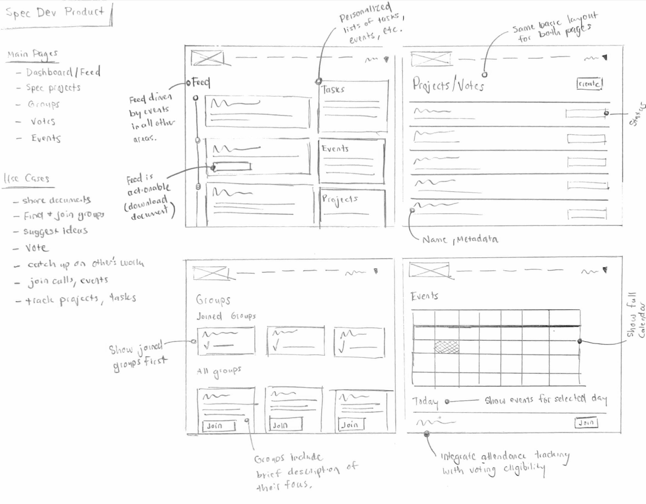
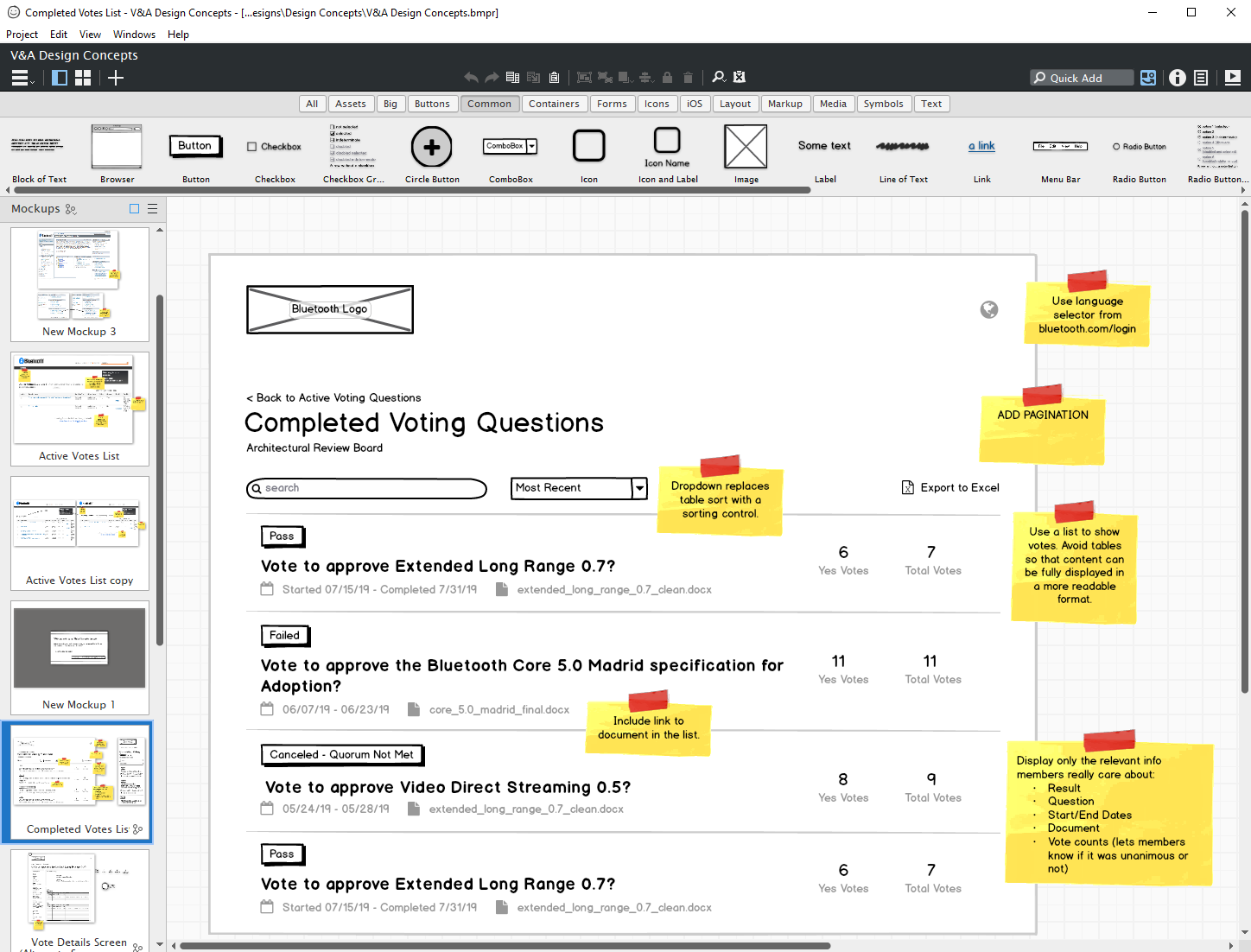
I liked Balsamiq for this kind of work because it was almost impossible to mistake the artifact for a finished design. That kept the conversation focused on the workflow instead of colors, spacing, or other details we weren’t ready to settle.
One deceptively simple question generated quite a bit of exploration:
How Should We Display Votes?
I tried tables, cards, and custom lists.
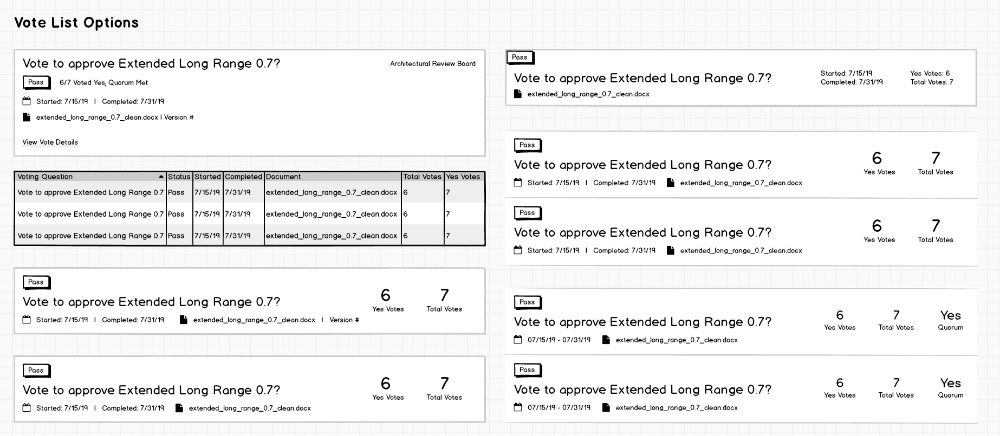
Tables gave us density, but long questions and document names became difficult to scan.
Cards looked nice but used a lot of space for information people primarily needed to compare.
The custom list was best at both. It accommodated long questions while preserving a compact, comparable layout.
Catching Inconsistencies in Critique
Before usability testing, I brought the work into our weekly UX design critique.
The team challenged several decisions, including something that should probably have been obvious in retrospect.
I had visually prioritized vote status in the list, but at the same time, I kept telling everyone that the member’s primary task was finding the correct question or document.
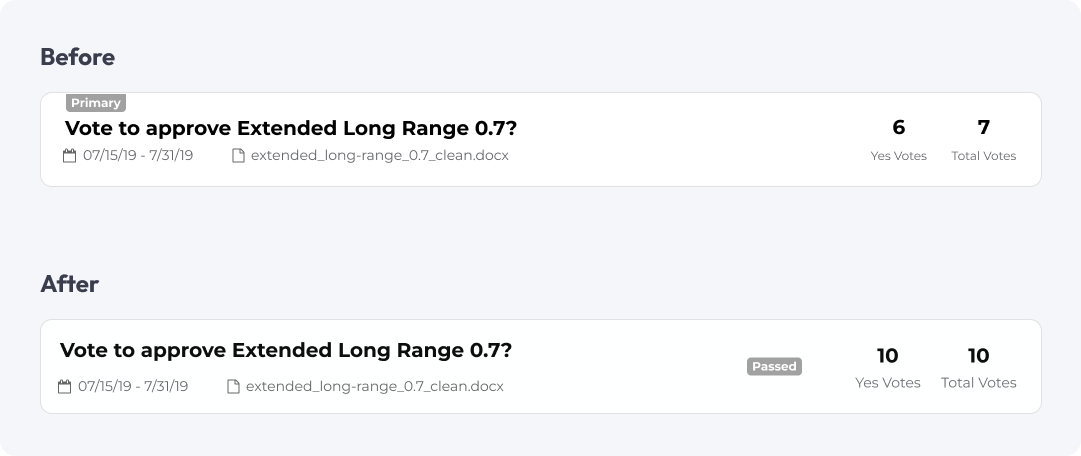
So I changed the hierarchy.
We also reorganized the vote-detail page and added guidance around the places where members would temporarily move between the old and new systems.
This is one of the reasons I’ve always valued critique. You can stare at something for days and completely miss the fact that your design is contradicting your own explanation of the problem.
Testing the Voting Experience
We conducted usability testing with six members using a prototype. We captured our findings using the Rainbow Spreadsheet method developed by Tomer Sharon.
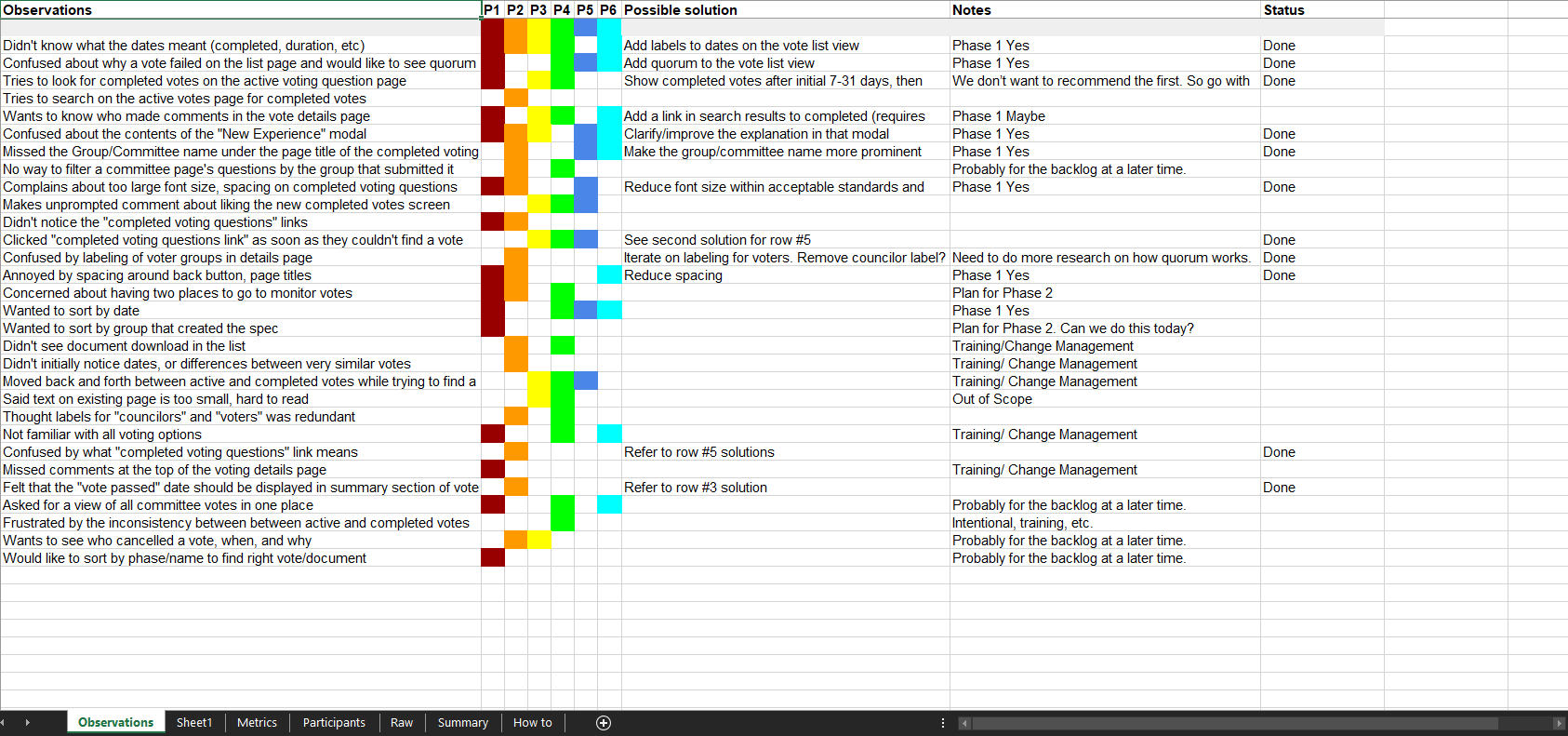
We then prioritized issues based on severity × likelihood instead of treating every observation as equally important.
Example Findings
Make Voting Status Easier to Understand
Members couldn’t tell what a date range represented, so we simplified it to the most relevant completed date. We also surfaced when a vote failed because quorum wasn’t reached.
Show Participation, Not Eligibility
Displaying hundreds of eligible voters created unnecessary noise, so we focused the interface on members who actually participated.
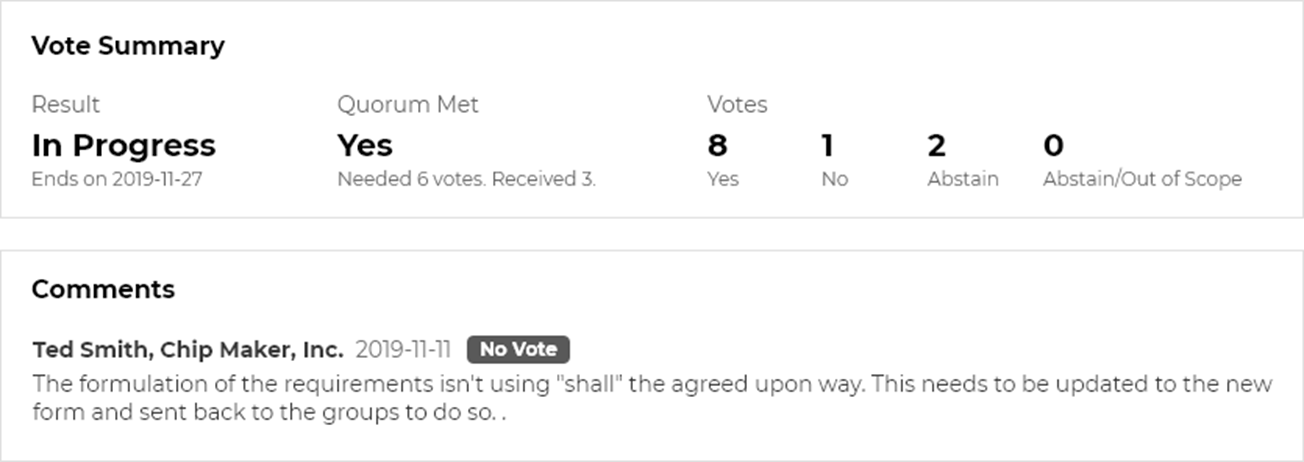
Make the Vote Summary Easier to Scan
The summary was too dense, so we separated documents, comments, and voting results into clearer sections.
Uncovering New Scenarios
We also uncovered a new use case: proxy voting.
A member could designate someone else to vote on their behalf, which meant one person might legitimately need to cast multiple votes. We hadn’t fully accounted for that.
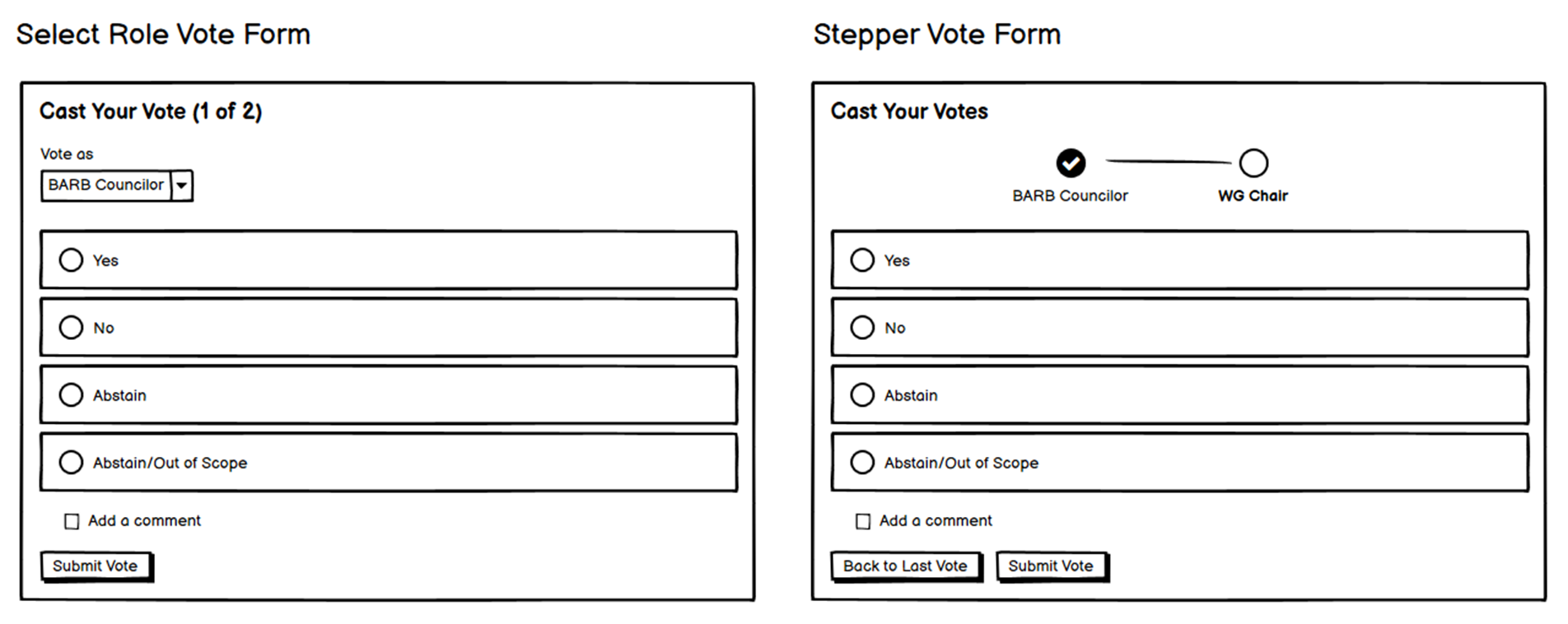
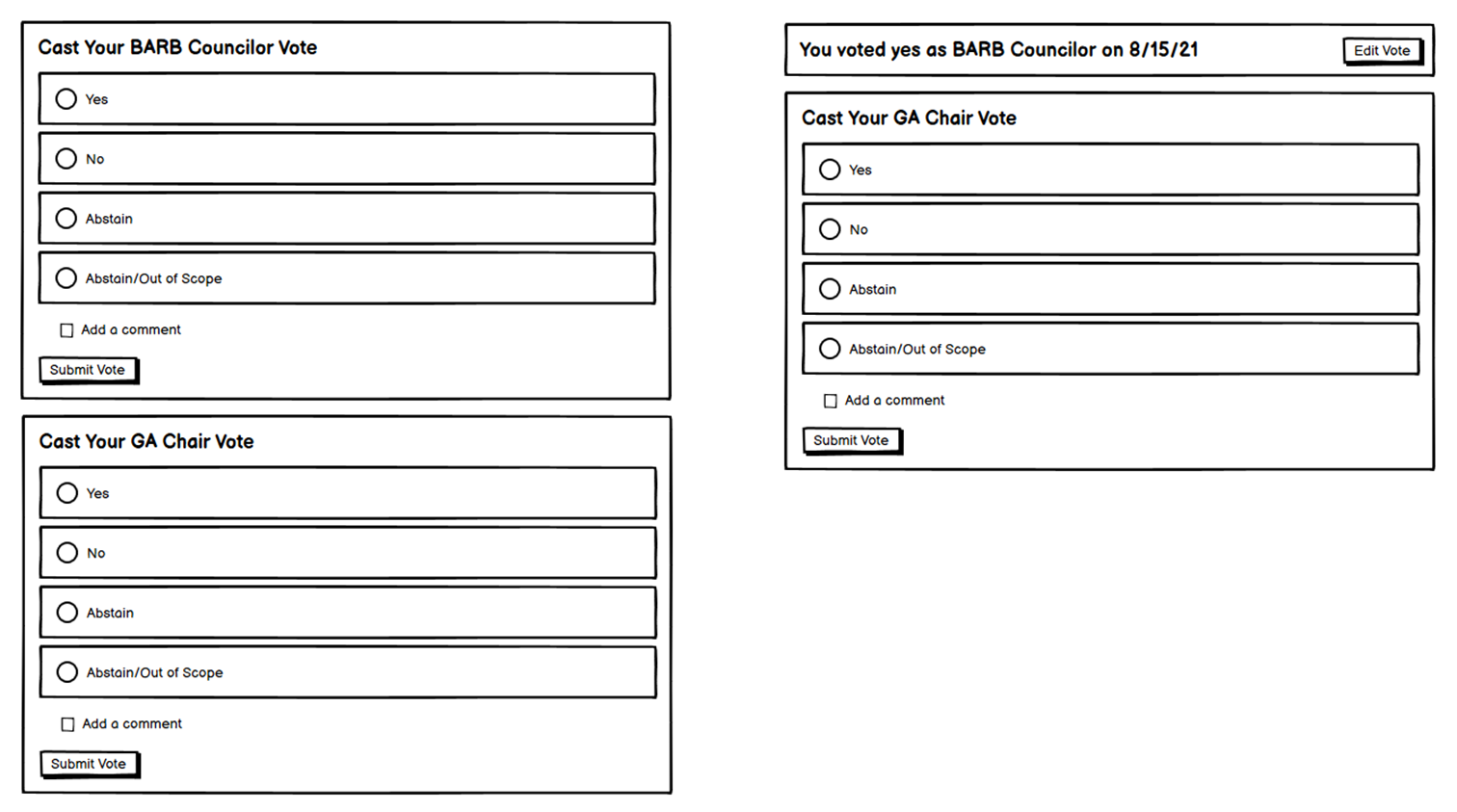
After another round of exploration, we landed on clearly labeled multiple voting forms that allowed someone to understand which vote they were casting and on whose behalf.
Return of the Compromise
Before launch, we put the experience into a functional prototype and conducted another round of tests with five members.
The biggest issue was exactly the one we’d expected.
Moving between completed votes in the new experience and active votes in the legacy system was confusing at first. That was the tradeoff we’d knowingly accepted when we decided to ship incrementally.
The good news was that members figured it out fairly quickly, and the benefits of the new experience were obvious.
- Finding historical votes and documents was easier
- The information was clearer
- And it was dramatically faster
That gave us enough confidence to move forward.
Shipping the First Piece
We launched the first piece shortly after a member event: the new experience for finding and viewing completed votes. Active votes still lived in the legacy system.
It wasn’t the seamless experience we’d eventually designed, but it got a meaningful piece of the new platform into members’ hands. Then feedback started coming in.
The new voting tool is much faster, and it’s much easier to find the documents being voted on.
The clarity of who voted and what the comments were is great.
Finishing the Voting Experience
Next, we tackled active voting.
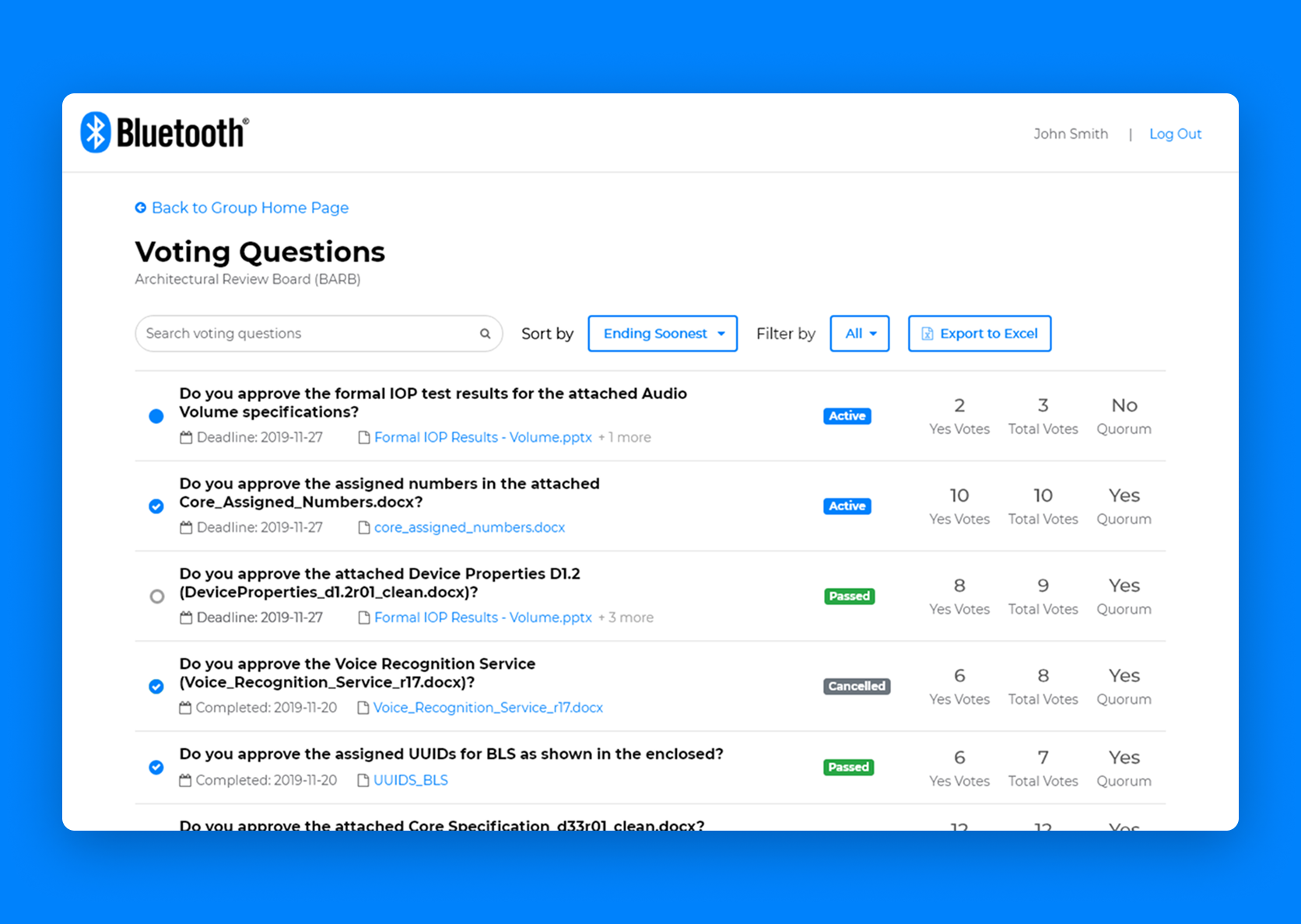
This brought the other half of the workflow into the new experience, so members could find, review, and cast votes without dropping back into the legacy system. Along the way, we incorporated lessons from the first release and addressed usability issues we’d uncovered, including proxy voting.
The final experience made it easier for members to find voting questions, cast their votes, and follow the results:
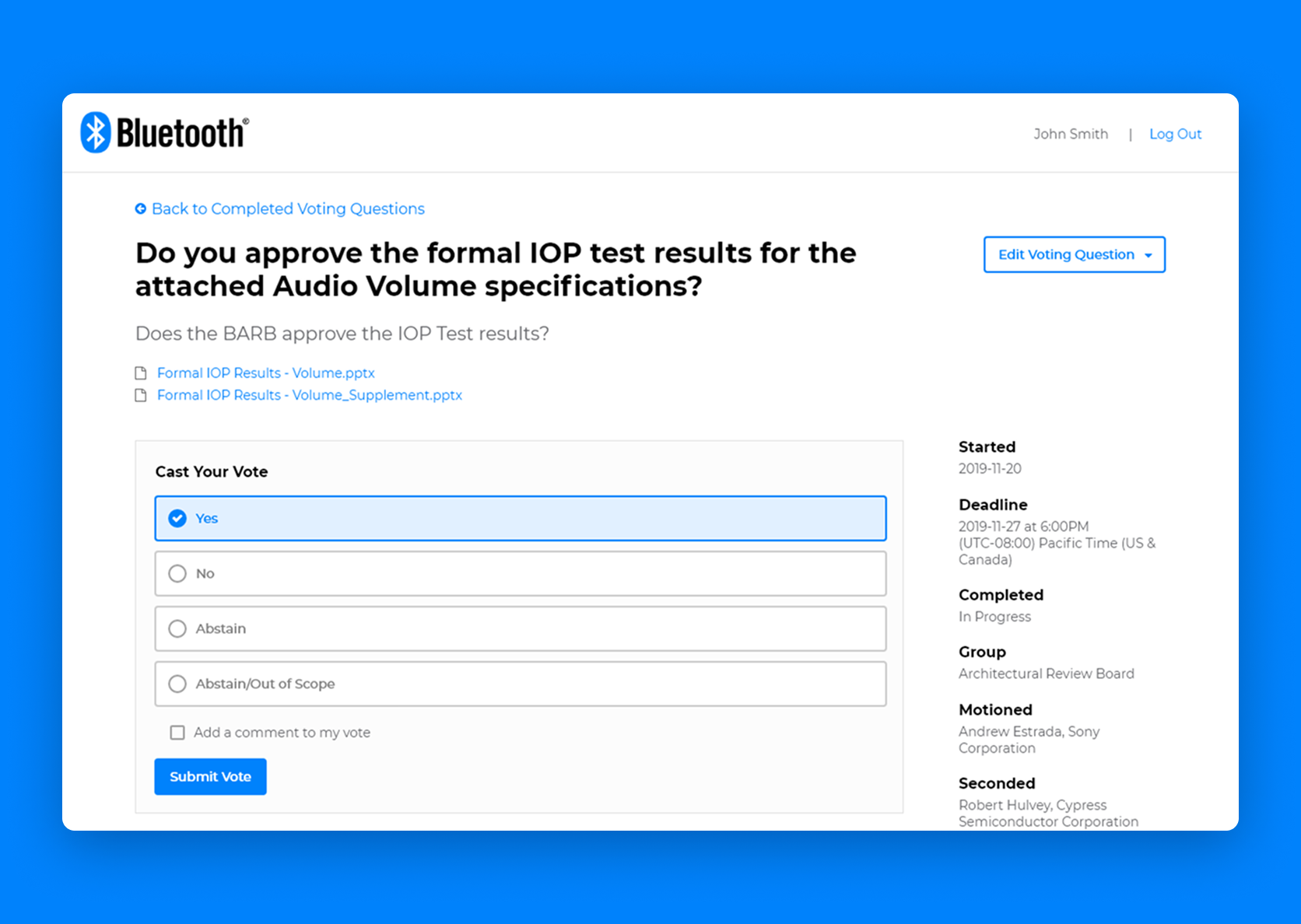
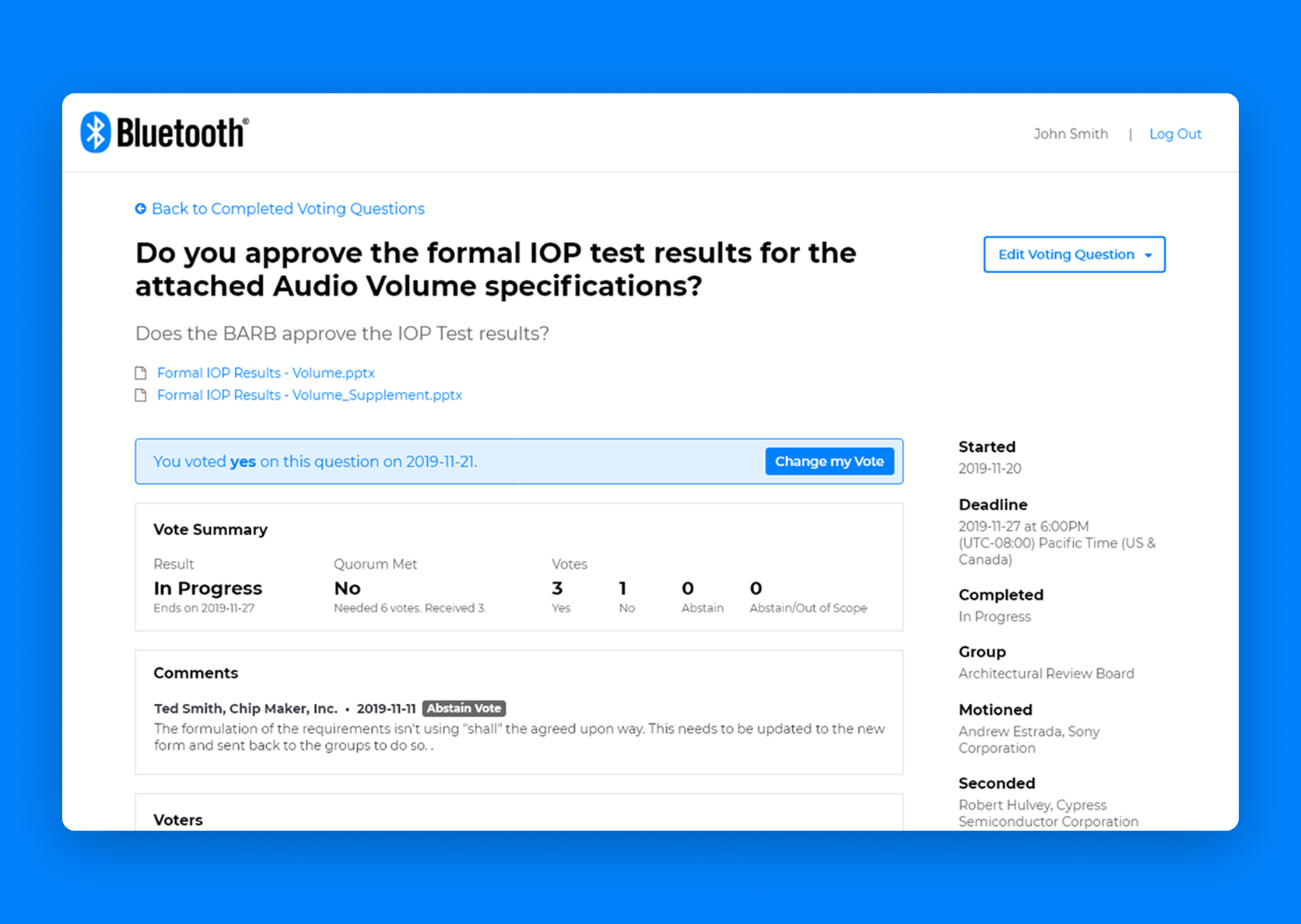
With both releases live, we could assess the impact of the complete voting experience.
The First Slice Worked
For a project that had briefly looked too big to get off the ground, seeing both voting releases in members’ hands was pretty satisfying. The results were encouraging:
More importantly, they demonstrated that we didn’t have to wait until we’d rebuilt an entire platform to make a meaningful improvement.
What Happened to the Larger Vision?
Voting was the starting point. We planned to continue replacing parts of the legacy platform, using the sitemap to help identify and sequence future releases.
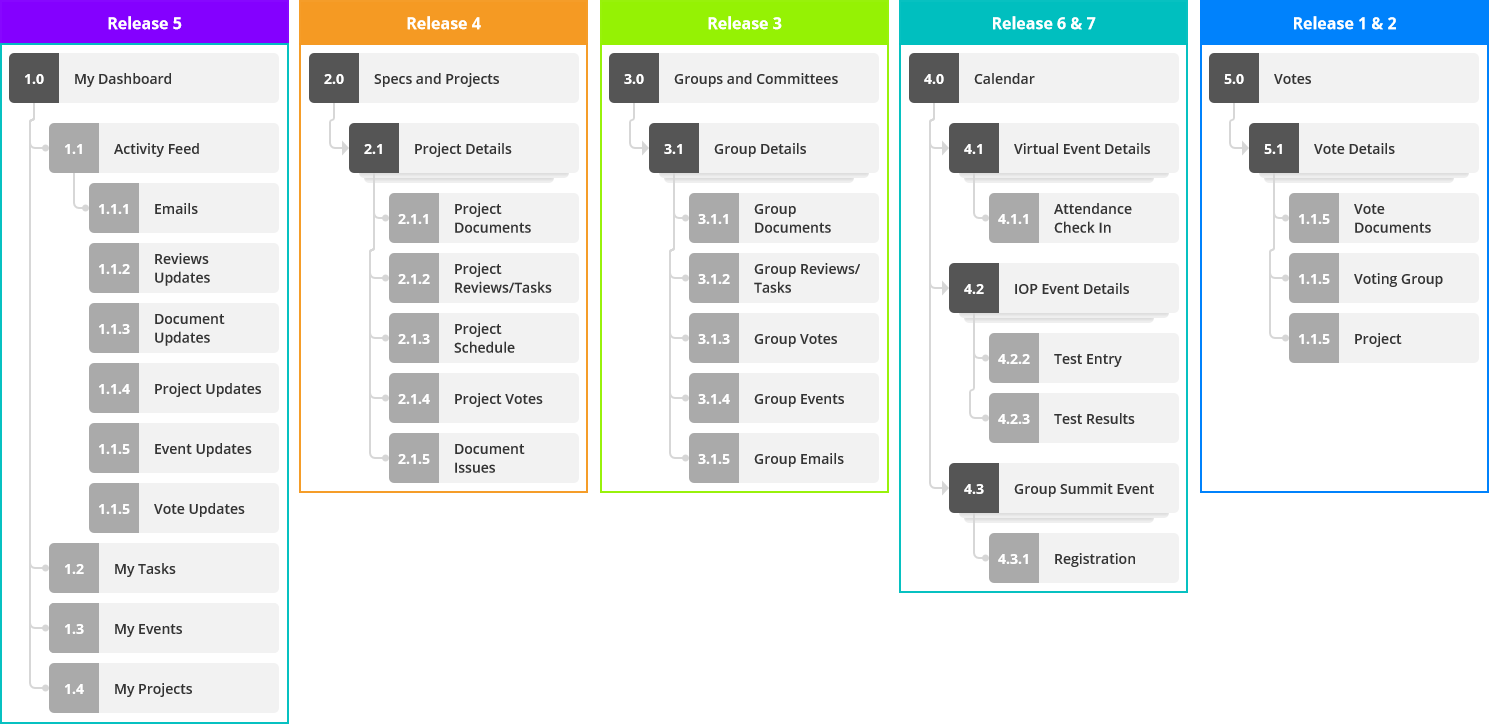
After I left the Bluetooth SIG, leadership changed direction and parts of the platform were ultimately replaced with commercial tools.
The larger platform wasn’t built as we envisioned it. The research had still changed the roadmap, and the vision had given the organization a shared understanding of the experience members needed. But the organization ultimately chose a different path to delivering parts of it.
What I Learned
This project made me more skeptical of the big, magical redesign.
Replacing a fragmented suite with one coherent platform sounded sensible. But I learned to ask much earlier how members would benefit before the whole thing was finished.
A North Star can be ambitious without requiring an ambitious first release.
I also came away with a more nuanced view of research. We did a lot here: mental modeling, personas, workshops, contextual inquiry, concept testing, and usability testing. I wouldn’t repeat that whole sequence on most projects.
Here, we needed to understand a complicated domain that wasn’t well understood internally. That investment gave us more than a foundation for the original design. It helped us make decisions when the architecture, scope, and delivery plan changed.
I’d carry that forward: build enough understanding to adapt the plan without losing sight of the people it’s meant to serve.
Read Next
When is Everyone?
Designing a mobile app that takes the stress out of getting together with friends.